
Sending SYSLOG messages to TCP hosts and POSH-SYSLOG V3.0
The Posh-SYSLOG module has been very popular since its first release in 2013. SYLOG provides a common integration point into enterprise monitoring, alerting and security systems and administrators and developers often need to push messages from their scripts and automation activities to a SYSLOG server.
There are two common pieces of feedback, TCP support and improving the performance. I am excited to announce a new version of POSH-SYSLOG, which introduces TCP support and a number of performance improvements.
Kudos must go to Jared Poeppelman (powershellshock) from Microsoft who provided the TCP logic, optimised performance, and added additional Pester cases. I took some time out to make some additional improvements on top of Jared’s work. Due to the significant changes and additional functionality, I am considering this to be version 3.0.
The easiest way to get the module is from the PowerShell Gallery using Install-Module -Name Posh-SYSLOG. You can also clone the GitHub repository.
The first big change by Jared, was to implement the Begin {} Process {} End {} structure for Send-SyslogMessage. With this structure, we can leverage the pipeline to send multiple messages. I have developed scripts where I needed to read application logs and then send them to a SIEM product using SYSLOG; access via the pipeline simplifies these scripts and hopefully improves their performance.
The logic around determining the correct value to be sent as the hostname has been cleaned up and refined. This piece was free of issues, however there were some small tweaks that potentially improved performance. The function is now called as part of the Begin {} block, improving performance for bulk message transmissions. The logic has been moved out to its own internal function, allowing for separate testing and better mocking opportunities in Pester.
Another source of performance improvement is the removal on the need to call Test-NetConnection. This is a dramatic source of improvement when Send-SyslogMessage is executed in a workgroup (that is, a non-domain joined) environment. Previously we called Test-NetConnection to determine the correct network interface that we are using to communicate with the SYSLOG server; now we simply ask the socket for the source IP address and then use Get-NetIPAddress to check if this is a statically assigned address.
All the network functionality and calls have been moved to internal functions. This helped with testing, I can now mock all the network activities which allows for better testing with Pester. The network tests are now much more reliable.
Finally, Jared and I have increased the number of Pester tests. I have tried to aim for over testing everything in the hope that all potential issues are flushed out. With a massive upgrade to the functionality, and such a refactoring have the potential to introducing issues. I am confident that things have been appropriately requested. If issues are found, please raise them via GitHub.
So what is the future now for Posh-SYSLOG? Well for now, I just want to ensure there are no bugs or issues, after that I want to look at implementing the other commonly asked feature; TLS support.
The PowerShell community has been amazing, I have been lucky to have such wonderful community contributions over the past few years. A massive thanks to Jared, Ronald, Xtrahost and Fredruk.
Kieran Jacobsen
Deconstructing Secure HTTP without HTTPS
“Anyone, from the most clueless amateur to the best cryptographer, can create an algorithm that he himself can’t break.”
Short Version
- A crowd funded effort to review Secure HTTP without HTTPS, available from the Unity Asset Store.
- Not safe for use.
- It is not secure, and has a number of cryptographic issues including shared keys, and non-random initialization vectors.
- Key synchronization process is highly susceptible to a man-in-the-middle and SQL injection attack.
- Data is only protected from accidental corruption.
- Code quality issues including reuse of code, SQL injection and poor data validation.
- Big thanks to Troy Hunt, Scott Helme, Ar0xA4, Andy Neillans, Mads Høgstedt Danquah, Bruce Blair, Steve Leigh, Mahdi Hasheminejad, and many others for donations and support!
Background
On a sunny day in early 2017, a colleague of mine, Steve Leigh, posted a link in Readify’s Slack. The link was to a product on the Unity Asset Store, Secure HTTP without HTTPS. The product claims to offer “Secure HTTP” without the need to deploy HTTPS. The description, and documentation claim that it will allow a server to accept a secure request from a client, and return a secure result back to the client. The client side is provided as a Unity Asset and written in C#, while the server side is written in PHP.
After a humorous discussion, I tweeted about Steve’s find: “Secure HTTP without HTTPS! https://www.assetstore.unity3d.com/en/#!/content/27938 …. I am sure @troyhunt will have a laugh. Thanks to @xwipeoutx.”. I found the entire thing amusing, and hoped others in the industry would as well.
Shortly afterwards, I mentioned on twitter that part of me was interested in looking at the code behind the product. I was interested to see what exactly they were doing, and how they managed to do something the rest of the cryptography industry had failed to do. What if they'd actually developed a decent product? Troy encouraged me to pursue looking at the code, and suggested using crowd funding to pay the $50 for a license. So, I created a GoFundMe campaign, put up a quick blurb on what I wanted to do, and posted the link out on Twitter.
Troy retweeted the link to my GoFundMe, and in under an hour, $55 had been raised! I genuinely never expected this sort of support or encouragement. I am very thankful to those who donated for their generosity:
- Troy Hunt
- Scott Helme
- Ar0xA4
- Andy Neillans
- Mads Høgstedt Danquah
- Bruce Blair
- An anonymous donor
I know a few people who wanted to donate missed out, and have since spoken with me, I want to thank you as well for your support.
The Goals of HTTPS and TLS
The aim of Secure HTTP without HTTPS is to be a viable alternative to HTTPS, but what would an alternative look like? What does HTTPS do? In order to review an alternative, we need to have some understanding of HTTPS and TLS.
Wikipedia describes HTTPS as “…communication over Hypertext Transfer Protocol (HTTP) within a connection encrypted by Transport Layer Security, or its predecessor, Secure Sockets Layer. The main motivation for HTTPS is authentication of the visited website and protection of the privacy and integrity of the exchanged data”. The page actually goes on to give an eloquent comparison of HTTP and HTTPS; “HTTP is not encrypted and is vulnerable to man-in-the-middle and eavesdropping attacks, which can let attackers gain access to website accounts and sensitive information, and modify webpages to inject malware or advertisements. HTTPS is designed to withstand such attacks and is considered secure against them…”.
Now that we have some better understanding of HTTPS, then what is TLS? What does it do?
Once again, back on Wikipedia, there is a lengthy, but excellent description of the primary aims of TLS:
“When secured by TLS, connections between a client (e.g., a web browser) and a server (e.g., wikipedia.org) have one or more of the following properties:
- The connection is private (or secure) because symmetric cryptography is used to encrypt the data transmitted. The keys for this symmetric encryption are generated uniquely for each connection and are based on a shared secret negotiated at the start of the session (see TLS handshake protocol). The server and client negotiate the details of which encryption algorithm and cryptographic keys to use before the first byte of data is transmitted (see Algorithm below). The negotiation of a shared secret is both secure (the negotiated secret is unavailable to eavesdroppers and cannot be obtained, even by an attacker who places themselves in the middle of the connection) and reliable (no attacker can modify the communications during the negotiation without being detected).
- The identity of the communicating parties can be authenticated using public-key cryptography. This authentication can be made optional, but is generally required for at least one of the parties (typically the server).
- The connection ensures integrity because each message transmitted includes a message integrity check using a message authentication code to prevent undetected loss or alteration of the data during transmission.”
Reducing all of this down, HTTPS with TLS, provide us with the following:
- We know that information transmitted over the connection is private, and others cannot determine the contents. This is achieved by:
- The use of unique symmetric keys for each connection.
- Negotiating these keys in a secure (private) and reliable manner.
- We can verify who the other party is, if we wish.
- We know that the information transmitted has not been modified, either maliciously or through data loss.
Evaluation Criteria
Now that we have a clearer understanding of HTTPS, we can start to look at how we want to assess Secure HTTP without HTTPS. I felt that the best evaluation criteria would be to assess how effectively it achieves the same outcomes as HTTPS. The code base should also be reviewed to ensure that it is at a satisfactory level, free from defects, and free of backdoors.
My final criteria for the review:
- Data transmitted is kept private, others cannot determine the contents.
- Data cannot be modified without changes being detected by the receiving party.
- Parties can verify who each other are.
- Sensitive material is handled in an appropriate manner.
- The code is free from obvious defects.
- There are no backdoors.
I opted to just do an offline code review, I didn't setup a running environment.
Now that I have the code, and the evaluation criteria, my next step was to put in a professional development request with my employer, Readify. One of the great reasons that I enjoy working at Readify is that we get some amazing opportunities to learn and develop our skills.
Once the time was approved, I got to work.
How does Secure HTTP without HTTPS work?
Secure HTTP without HTTPS, or SMAES as it refers to itself, has two components, a client component, which is a Unity Asset written in C#, and a server component written in PHP.
Implementing the client components of SMAES is easy and only a minimal amount of changes is required to your code. You start by importing the required classes, add the initialization code, specify a shared key, and then ask it to encrypt (or decrypt) information as required.
The server implementation expects that you are using PHP. Once again integration is simple, include the files as required, add some initialization code, specify the same shared key as the client and once again encrypt and decrypt information as required. Optionally, you may want to setup and configure a SQL table on either MySQL or PostgreSQL for storing client keys.
So, what does an “encrypted” conversation look like? On the client side, we perform the following steps:
- Assemble the HTTP request, with parameters. For example: [http://myserver.com/smaes/mypage.php?password=MyPasswordIsSecure&username=Kieran]
- Call SMUtil.encryptURL(URL). Under the covers, the function performs the following steps:
- The Unity variable SystemInfo.deviceUniqueIdentifier is reversed and stored as device ID. We will discuss this Unity variable later.
- AES class is created, with the device ID as the initialization vector and the shared key as the AES encryption key.
- For each parameter in the URL, the value is encrypted with AES, and hashed and encrypted as a check value (PC). The request URL is modified to include: the device ID, each parameter and its encrypted value, each parameter’s encrypted md5 hash as name_PC. The resulting string is returned: http://myserver.com/smaes/mypage.php?password=encryptedstring&password_pc=encryptedmd5hash&username=encryptedstring&username_pc=encryptedmd5hash
- Now you perform the request as you normally would in Unity.
- Decrypt the server’s response using SMAES.decryptTLF(string) as required.
Data Confidentiality
Use of a shared key
In TLS, transmitted data is kept private by encrypting it with symmetric cryptography. They keys used for the symmetric encryption are generated for each connection and are based upon a shared secret negotiated at the start of the session. In TLS, only the client and the server can read the data transmitted, no one else.
With Secure HTTP without HTTPS, data is still kept private through the use of symmetric cryptography, however the key used is fixed for all clients and the server. Whilst the data is private from a casual observer, the data sent from one client to the server isn’t private to the rest of the clients. The issue is, if more than 2 people can read the private data sent, is it really that private?
SMAES also provides functionality for the client and server to synchronize to new, random encryption keys. This is performed via the SMKey.syncKey() and syncKey.php on the client and server respectfully. During this process, the server will generate a new encryption key and send it back to the client. The new key will be the md5 hash of a timestamp and the clients IP address. Unfortunately, there is a critical issue in this functionality, as discussed in Device ID as Encryption Key.
Device ID as Initialization Vector
Initialization Vectors (IV) are a fixed-sized random input into a cryptographic function. The reason these values are random is to ensure that encryption functions achieve semantic security, that is, where repeated usage of the same key does not allow an attacker to infer relationships between parts of an encrypted message. In an algorithm like AES, the key protects our data but the IV ensures that if two identical pieces of text are encrypted, they do not produce the same encrypted result; as such the IV needs to be random and unique every time we go to encrypt something. The IV doesn’t protect the data, so we can transmit it as plaintext with the data; an eavesdropper will gain nothing from learning the IV. If you want to know more about initialization vectors, I recommend this CryptoFails post: Crypto Noobs #1: Initialization Vectors.
During my review, I discovered that a fixed value was being used for the IV. SMAES uses the Unity SystemInfo.deviceUniqueIdentifier as the IV for all encrypted transmissions, something that whilst unique per client, is not going to be random and unique on each use. It Is my belief that they did this as a workaround for the fact they are using a shared key on all of the clients, no matter, there is no justifiable reason to implement a fixed, non-random IV as it dramatically weakens the cryptographic protection of AES.
For those of you interested, according to the Unity Documentation, SystemInfo.deviceUniqueIdentifier is a unique device identify that Unity will determine differently, depending upon the client’s platform:
- For IOS:
- Prior to iOS 7: hash of MAC address (the WIFI adapter).
- After iOS 7: UIDevice identifierForVendor or ASIdentifierManager advertisingIdentifier.
- Windows Store Apps: AdvertisingManager::AdvertisingId or HardwareIdentification::GetPackageSpecificToken().Id.
- Windows Apps: A hash of the following identifiers combined:
- Win32_BaseBoard::SerialNumber.
- Win32_BIOS::SerialNumber.
- Win32_Processor::UniqueId.
- Win32_DiskDrive::SerialNumber.
- Win32_OperatingSystem::SerialNumber.
- Android: I don’t see any documentation, however on the forums I found that the logic has changed a number of times. It currently appears that it could be: IMEI/MEID/ESN or ANDROID_ID (a random string that is created when you first setup an Android device) or MAC address.
- Unsupported Systems: SystemInfo.unsupportedIdentifier.
If you are not convinced about the risks of a poorly selected IV, consider the 802.11 encryption algorithm WEP (Wired Equivalent Privacy). In WEP, a short 24 bit IV was used, this wasn’t enough, leading to IVs being reused with the same key, and led to the key being easily cracked.
Device ID as Encryption Key
Now we get to the most shocking, and unbelievably foolish issue that I discovered during my review.
To improve security, the developers included a mechanism for the client and server to synchronize a new encryption key, as I previous said, to alleviate the issues of having a single shared key. Unfortunately, in their attempt to do so, they introduced what is one of the most significant vulnerabilities in the product, one that makes man-in-the-middle attacks trivially easy.
The developer’s goal was to have a function which a client could call, and have the server provide a new key for the AES encryption, except a new vulnerability is introduced. When the Client calls the function syncKey() (shown in the image below), AES is reconfigured with the device ID being used for BOTH THE IV AND AS THE KEY. The client sends the device ID and the original shared key to the server, just as any other call, and the server generates a new key sending it back to the client with the device ID as the encryption key. Yes, we are going to send our encryption keys in plain text now.
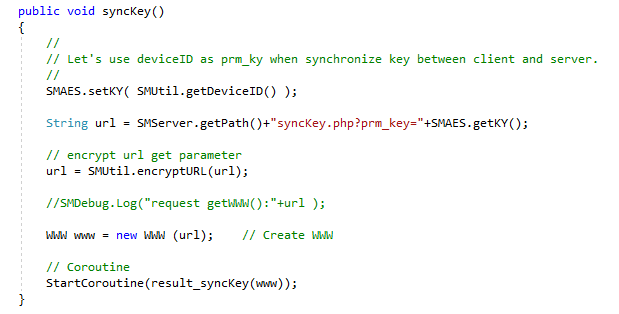
The client function syncKey(), used to negotiate a new key with the server, sets the encryption key to the device ID.
This flaw is perfect for an attacker who is either passively observing the traffic or is performing a man-in-the-middle attack, as they will be able to determine the new key in use between the client and the server, and then use that to decrypt any requests that subsequently occur. Their attack could take the following form:
- Attacker waits for client to begin talking to the server, they record all, or at least the HTTP traffic sent between the client and the server.
- Client application places a request to syncKey.php. In this request, they send the device id and the shared key (encrypted with the device id).
- Server then generates a new key, and sends it back to the client. The new key will be encrypted with the client’s device id as the key.
- Attacker has observed the traffic in steps 2 and 3. Using the device id sent in 2, they can decrypt the message in 3, and determine the new key.
- Attacker can now decrypt any messages sent.
Data Integrity
In TLS, data integrity is ensured using Message Authentication Code (MAC), with a variety of algorithms available for use. Hash functions and MAC functions are often confused, however I found a neat explanation on the differences on Stack Overflow: What is the Difference between a Hash and MAC (Message Authentication code): A Hash function will blindly generate a hash of a message without any input, whilst a MAC uses a private key as a seed to the hash function when generating its output. MAC’s allow us to ensure a receiver that not only has the message not been tampered with, but the sender was in fact who we were expecting it to be.
In SMAES, data integrity is only provided for information sent by the client to the server, there is no integrity (only confidentiality) for data sent from the server back to the client.
The developer has chosen to use the MD5 algorithm for hashing throughout, and whilst MD5 was originally developed for cryptographic hashing it’s security has been severely compromised. Weaknesses in MD5 have been widely exploited, see the Flame Malware; most security professionals will recommend against its use due to these issues. Due to this selection, SMAES in reality only has protection against unintentional corruption.
Verification of Parties
We can verify the parties of a communication in TLS through the use of public key cryptography. Typically, in TLS we opt to authenticate at least one party, and unusually that will be the server. Public key cryptography, or asymmetric cryptography uses a pair of keys, one being a public key, which we often disseminate widely and a private key that is only known to the owner. We can use these keys to provide both authentication and encryption.
SMAES makes use of a symmetric cryptography protocol, AES throughout. Symmetric protocols make use of a single key that is shared between both parties. In the case of SMAES, this is either the shared key we hard code, or the key produced via the synchronization process. Symmetric protocols do not offer any verification of the parties, as the cryptographic key is potentially widely shared. In the case of SMAES, there is no way for a client to validate that it is talking to the server, and not just to another client.
Handling of Keys and Data
There are a number of ways that keys and sensitive data can be mishandled, resulting in exposure and compromise. In my experience, application logging is a significant vector where sensitive data can be exposed. Sensitive data exposure is one of the items in the OWASP Top 10 application vulnerabilities. In this situation, attackers don’t need to break the cryptography, they just need to gain access to the server and read the log files. A successful attack resulting in the compromise of the log files results in a compromise of all of the protected data. The OWASP Logging Cheat Sheet specifically highlights that sensitive information should never be recorded in logs, but should be removed, masked, sanitized, hashed, or encrypted.
Taking a look at the client, we can see that the logging is disabled by default. We can enable it manually by either: setting m_IsDebug=1 in SMDebug.cs; or running a debug build.
During my review, I found that the client code exposes unencrypted data by writing it to the log file. For instance, when encryptURL() is called, prior to returning the result to the calling application, the encrypted and plaintext versions of the URL will be written to the logs.

Client logs plaintext and encrypted text
Taking a look at the key synchronization, we can see in result_synckKey() that the client’s new key will be written to the log file.

Client logs that the shared key has changed
Things don’t improve on the server side, where logging is enabled by default. The shipped default is for logging to be enabled, however you can change this through the $SMCONFIG[‘debug’] variable in SMConfig.php. There is a recommendation to disable the logging in production, yet I would have to wonder how many people would actually heed this advice.
When we look at the decryption functions in the server side, we can see that decrypted values are being stored in the logs (as seen in the image below).

The server logs a plaintext
Things deteriorate when we take at a look at the key synchronization process. The entire key generation process leaks a new client key over and over again, (as you can see in the images,) beginning shortly after the key generation, an entry of ”Info : generate key_val for key_id($key_id) : $key_val\n” being created, then if storing the value in MySQL or PostgreSQL, the entire insert query is logged, “OK : succeeded to update DB : $q\n”; finally, just to be sure, the new key is stored again “Info: new prm_key : $key_val\n”.
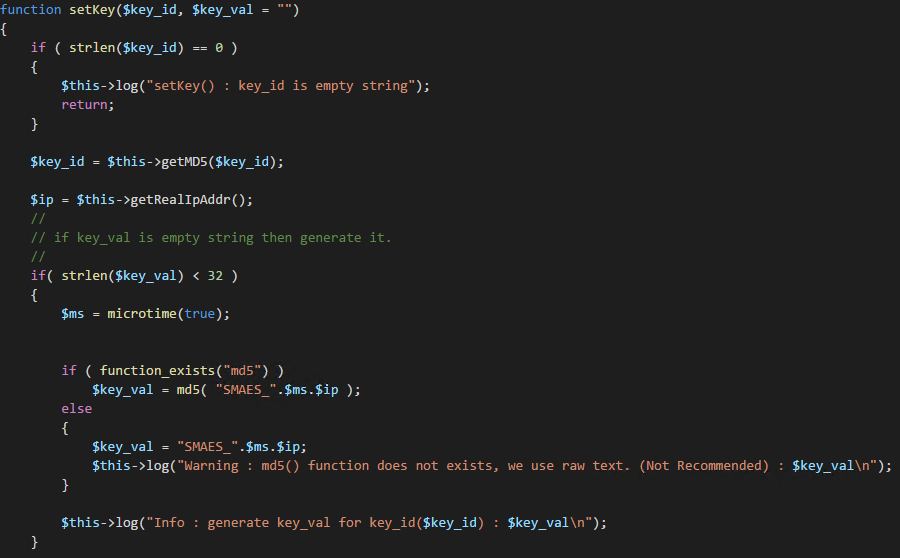
We generated a new key, let’s put it in the log file.
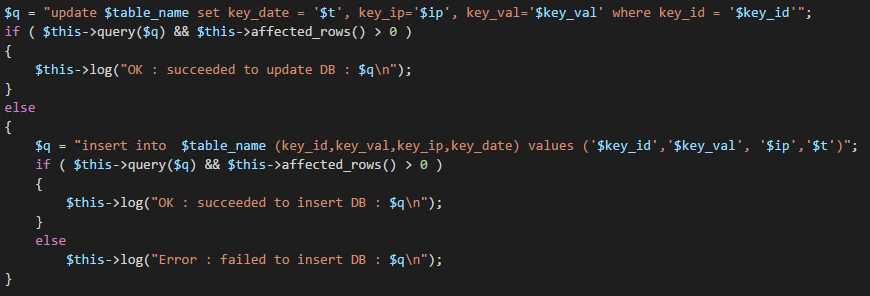
Let’s put the whole insert statement into the log file.

Just so you really do know, we created a new key.
Coding Defects
My first impressions of the code were that it was written by a developer who had a familiarity with good coding practices. Functions, parameters, and variables had descriptive names. Comments were there, I would have appreciated some additional comments in some places.
As I progressed, I started to gain the impression that two developers were actually behind this project; one who started the project, and knew how to design reusable code, and another one, who finished off the project and didn’t have the same level of skills and experience. The client and server side share some similar design patterns, but whereas the client code is very robust and well implemented, the server code isn’t.
“Copy and paste is a design error”
A number of times I saw code, especially in the server code, that was obviously copied and pasted between different sections, instead of opting for a more reusable design. There are a number of areas where the same chunk of code is copy-pasted about, these would have been better as shared code. Instances include the generation of keys, and the logic for determining a client’s IP address.

New client key generation code is cut and pasted between the different key storage methods.
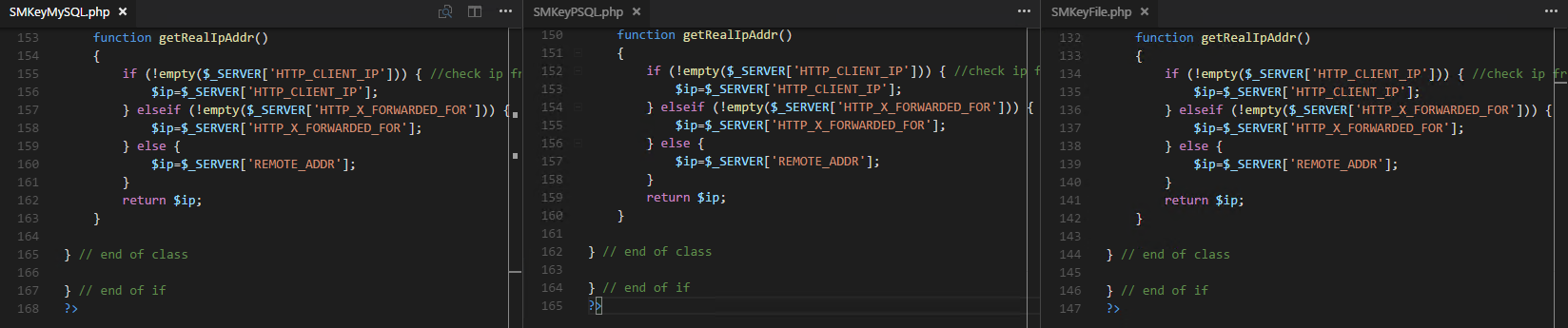
Code to determine the clients IP address is repeated throughout. Here are just 3 examples.
There is an SQL Injection risk within the server code. The code does not use prepared or parameterized statements, all of the queries were performed using dynamically created queries. The time it would have taken to use either PDO or MySQLi is trivial, which leads me to wonder if the developer either doesn’t know of the risks, understand the risks, or assumed that it wasn’t important to protect against them.
I see two potential ways that an attacker could abuse the SQLi vulnerability. If the server doesn’t support MD5 (it is optional server side), they could specify an SQL statement for the device ID when calling syncKey.php. The second method, and easier method, would be to call syncKey.php, and specify an SQL statement for one of the HTTP headers, either HTTP_CLIENT_IP, or HTTP_X_FORWARDED_FOR.
One effective SQL statement would be: say “; DELETE FROM $table_name; --“, as it would result in the table containing the client keys to have all of its entries removed. When the client stops working, most users would typically close and reopen the app, triggering off calls to syncKey() and syncKey.php. If the attacker combined this vulnerability, with the vulnerabilities found earlier in the key synchronization, they could potentially learn the encryption keys for all of the connected clients.

SQL Injection in the function getKey in SMKeyMySQL.php
Data validation is non-existent on both the client and the server. Both sides regularly accept input, without so much as validation on the length or the contents. Validation is a simple control and should be performed at all stages, from checking that a base64 string doesn’t contain invalid characters, to checking that a device ID is an appropriate length and structure (setting aside how Unity doesn’t enforce any sensible values for SystemInfo.deviceUniqueIdentifier).
Backdoors
Throughout my review, I wanted to ensure that there were no deliberate backdoors in the code. I found no instances of data being sent to remote servers. The code is free of backdoors.
Conclusion
Considering everything I have seen, and everything I know about HTTPS and TLS, I cannot recommend that people consider using Secure HTTP without HTTPS, and I would go as far as to say that it is unsafe to use. It does not provide the same level of protection be it confidentially, integrity or authentication as provided by HTTPS and TLS.
There really are no valid reasons to stick with HTTP over HTTPS, especially when developing applications for mobile platforms. We have projects like Let’s Encrypt providing free certificates supported by every major browser manufacturer and CloudFlare providing SSL as part of their free product offering. If you don’t want to use free offerings, there are still plenty of low cost, well trusted Certificate Authorities out there as well.
From a performance perspective, HTTPS is faster than HTTP due to its support for things like HTTP/2. Troy has an excellent post about why HTTPS is faster in: I wanna go fast: HTTPS’ massive speed advantage.
Finally, Google will rank pages that support HTTPS higher than those which don’t. If you care about your company/app/product, then HTTPS is critical from an SEO perspective.
Thanks
I want to thank everyone once again who has been involved in this or that contributed. Big thanks go out to Troy Hunt, Scott Helme, Ar0xA4, Andy Neillans, Mads Høgstedt Danquah, Bruce Blair and the anonymous donor, without you, this would not have happened. I also want to thank fellow Readifarians Steve Leigh for finding Secure HTTP without HTTPS, and Mahdi Hasheminejad for looking through everything with me.
This whole process has left me blown away with how amazing the Information Security community can be, thank you all for such a wonderful gift for the start of 2017.
Update 2017-01-30
Secure HTTP without HTTPS has now been removed from the Unity Store.
Crossing the PowerShell streams
I was recently working with the PowerCat code which was capturing the Pipeline and Error output of code, and wondered, could I also capture the other messages being displayed? Why couldn’t I also redirect the warnings or the verbose output as well?
Let’s revisit how the redirection of the streams works in PowerShell, and hopefully learn about how PowerShell does things under the covers.
To explore the output streams, I am going to use the CMDLet I have below, which is a varation of the one June Blender used in her post on this topic.
It should also be noted that redirection to a variable is similar as to a file. In my examples I am redirecting to a variable.
So what happens if we run this CMDLet normally? We should see four distinct messages, first is out the text we are displaying by just returning a string, next we will have our write-output, then we have write-warning, and finally we will have the wrote-error message (and its associated trace).

What happens if we decide to assign the output to a variable called $output? Let’s take a look.

As you can see, after running the function, we still saw the warning and error messages. What was stored in the variable? Well if we look at that we can see that the text return and the write-output were successfully assigned to the variable $output.
Ok, so how about we apply the old redirection rules that have existed in every shell since the 80s?

Well this is much as we expected, but wait, the warning was displayed and not captured in the variable. The variable has our two output strings and it also has the write-error message as well. As a side note I love how the when calling $output PowerShell still displays the error in red.
If you are running PowerShell 2.0 (or less), this is the end of the line for you. There is no help for you.
If you are running PowerShell 3.0 (or greater), then how do we capture that warning message? What about the verbose?
With the introduction of PowerShell 3.0, Microsoft included support for capturing the other streams, and they did so in a method which is simple, clean and logical. Microsoft simply extended the stream redirection along the well-known and practiced methods.
Let’s take a look at the streams in PowerShell 3.0:
| Stream Number | Stream Description | Redirection |
|---|---|---|
| 1 | Pipeline/Output/Success | > |
| 2 | Error | 2>&1 |
| 3 | Warning | 3>&1 |
| 4 | Verbose | 4>&1 |
| 5 | Debug | 5>&1 |
| * | All | *>&1 |
Let’s take a look at the previous example again, however this time we will redirect the output of stream 3, warning, to stream 1.

As you can see, we captured this information just as expected.
Let’s try verbose output now.

We can see that simply using 4>&1 captures the output. We can also capture all output using the wildcard, *>&1.

I can hear one person asking, “But what about write-host?”
There are many reasons why you should not use write-host, firstly, Jeffrey Snover, the creator of PowerShell says not to, Don Jones, a PowerShell MVP says “Write-host kills puppies” <link>, however both agree, as does the PowerShell community, that there are some times when it might be handy to use Write-Host. Write-Host is black PowerShell magic, it’s the dark side of PowerShell. It is not something you should do without very thoroughly thinking about what you are about to do.
The only legitimate time to use Write-Host, is when you do not want to interrupt or pollute your stream. If you have a situation where you wish to display text to the user in such a way that it will not be caught up in the pipeline.
I only use Write-Host in one piece of code. I use it as part of my modular alerting framework, where I know that the message needs to be seen by the actual user of the code. I also didn’t want event/alert messages contaminating any of my other pieces of code. When I wrote the code, I knew it was a risky piece of code, however it has a clear cut function and purpose.
So what happens to Write-Host and redirected streams? To show you, I have added a Write-Host line to our previous CMDLet as show below:
Let’s run the code, redirecting all input (*>&1) into $output.

As you can see, the write-host was still displayed, everything else was captured in $output.
So what information is around on stream redirection? There are three good resources, firstly, check out June’s post on Hey Scripting Guy, secondly, PS> Get-Help about_Redirection and finally, there is the Microsoft Connect entry where the functionality was requested.
Kieran
PS. No streams were crossed during the creation of this post.
Revisiting Syslog in PowerShell
I have performed a number of updates to the PowerShell SYSLOG module since this post. You can read the latest post. The module has been renamed to Posh-SYSLOG.
The GitHub location has been moved to https://github.com/poshsecurity/Posh-SYSLOG.
The module is now available on the PowerShell Gallery.
I often wonder, as I am sure most developers do, if people ever actually read and use the code that I post online. Was it helpful to them or was it useless? Did they use it for something interesting? One piece of code which I know people do use, is my PowerShell SYSLOG code.
A few weeks ago, a user opened my very first GitHub issue! This issue appeared at first to be simple, but as the user and I started to delve into the complexities of the various SYSLOG RFCs, I realized it was far from it.
Before we get into the issue, the code and the resolution, it is worth highlighting that there quite a few IETF RFCs that relate to SYSLOG messages. The two primary ones being:
- RFC 3164 - BSD SYSLOG. This actually wasn't an IETF standard.
- RFC 5424 - IETF SYSLOG. This is a IETF standard. This obsoletes RFC 3164.
There are also RFCs:
- RFC 3195 - Reliable Delivery for SYSLOG
- RFC 5425 - TLS Transport Mapping for
- RFC 5426 - Transmission of SYSLOG Messages over UDP
- RFC 5427 - Textual Conventions for Syslog Management
- RFC 5848 - Signed Syslog Messages
- RFC 6012 - Datagram Transport Layer Security (DTLS) Transport Mapping for SYSLOG
- RFC 6587 - Transmission of SYSLOG Messages over TCP
I want to send a very big thanks out to the user, DFCH for reporting the issue, helping me understand the RFCs in question and also testing the resulting code.
The Issue
So what was the issue? As DFCH stated:
“The Cmdlet send-syslog.ps1 states in its description to send a syslog message as defined in RFC 5424. However the generated timestamp in the Cmdlet incorrectly formats a timestamp when none is specified by the caller, nor does it validate or convert the timestamp if specified by the caller.”
I will admit that I hadn't ready RFC 5424 or RFC 3164 in a huge amount of detail. As soon as I did it was very obvious that the code was not producing an appropriate timestamp, it also become evident that the overall message I was sending did not meet the RFC specification.
From my analysis, it appeared that I had crossed parts of both RFC 5424 and RFC 3164, ending up with code that wasn't fully complaint to either, and in the long run, not entirely useful.
As DFCH reported, the code didn't not generate the appropriate timestamp, with issues in how it was formatted as well as the precision. Resolving these issues was quite simple, the timestamp could be formatted as recommended by DFCH, this not only resolved the format issue but also increased the precision. Validation of the caller specified timestamp was also easy to implement. I simply changed the parameter to take an object of type DateTime instead of a String.
But this was just the start of the fixes, as I continued to read and understand the RFCs, I realized my messages were incorrectly formatted as well.
Message Formats
There are two valid SYSLOG message structures as defined in RFC 3164 and 5424.
Firstly, RFC 3164 specifies the message structure to be the following:
<PRI>TIMESTAMP HOSTNAME TAG CONTENT
Where:
- PRI - Value based on severity and facility
- TIMESTAMP - What date and time with format MMM dd HH:mm:ss
- HOSTNAME - Who is sending the message
- TAG - Name of the process or program generating the message
- CONTENT - Obviously the message being sent
Next, RFC 5424 specifies the message structure as:
<PRI>VERSION TIMESTAMP HOSTNAME APPNAME PROCID MSGID STRUCTUREDDATA [CONTENT]
Where:
- PRI - Value based on severity and facility
- VERSION - Version of the SYSLOG message (typically 1)
- TIMESTAMP - What date and time with format: yyyy-MM-ddtHH:mm:ss.ffffffzzz
- HOSTNAME - Who is sending the message
- APPNAME - Name of the process or program generating the message
- PROCID - Process ID of the application or script
- MSGID - An Identifier to assist in troubleshooting
- STRUCTUREDDATA - RFC 5424 specifies a method of sending key/value pairs
- CONTENT - Obviously the content of the message
One thing to note with RFC 5424 is that the majority of the fields are optional, you still need to send something to ensure the correct layout however, so the nil value "-" is sent. I should also point out that the RFC states that the CONTENT section at the end is completely optional. If nothing is sent, you don't need to even send the nil value.
My original code on the other hands, was sending messages with the structure of:
<PRI>TIMESTAMP HOSTNAME CONTENT
Where:
- PRI - Value based on severity and facility
- TIMESTAMP - What date and time with format: yyyy:MM:dd:-HH:mm:ss zzz
- HOSTNAME - Who is sending the message
- CONTENT - Obviously the message being sent
How did this happen?
Well, there are a few reasons why this occurred, in no particular order.
- I borrowed some of the logic and ideas from other .Net and PowerShell code samples
- I didn't read either RFC
- The SYSLOG servers I tested against were not stringent in their rendering of messages received.
- I referred to Wikipedia when I was checking that my messages were correctly formatted.
In hindsight, the biggest mistakes were using Wikipedia as my guide, and not testing against a more RFC compliant server.
Using Wikipedia as a source for developing compliant code is probably a bad idea, on this occasion it was a great learning experience. Previously the SYSLOG Wikipedia article did not correctly describe the layout and formatting of the full message, crucially missing out the information about the TAG field. The article has been updated since then with corrections ensuring that it is more understandable. It should be noted however that overall, the Wikipedia article is still focused on RFC 3164 and not 5424.
Let’s look at how we clean-up the code.
Additional Parameters
To ensure that we have enough information to support RFC 5424, I needed to add some additional Parameters (which are not mandatory). These include ApplicationName, ProcessID, MessageID, StructuredData and a switch RFC 3164.
The switch RFC 3164 will simply tell the code to send a message in the RFC 3164 format, instead of sending it via RFC 5424 which is its default.
Hostname Generation
Previously, if the hostname parameter was not specified in my code, I simply used the hostname.exe. Whilst there isn't any problems with this, however RFC 5424 actually specifies in some detail how the hostname field should be determined:
- The FQDN of the server
- A static IP address
- The hostname of the server (Windows will always have on of these)
- Dynamic IP address
- A NILVALUE (-)
I have updated my code to generate the hostname component of the SYSLOG message via the first 3 steps.
Application Name
The Application name can be a little difficult. Typically from within a function we can determine the name of the script which is calling the function via 2 properties of the $myInvocation variable: ScriptName and PSCommandPath. I have used ScriptName with success in the past, and hence decided to use it again. There is one thing to note, if I am sitting at a console and call send-syslogmessage, then ScriptName will be null, and if that is the case, we will simply use “PowerShell”.
Process ID
The Process ID is new requirement to ensure RFC 5424. We get this simply from the $PID global variable.
Message ID and Structured Data
These two will always be user specified, if the user doesn't specify them, then send the default RFC 5424 nil value of "-".
Message Generation
Now that we have all of the information required for either RFC, we can now look at message generation. When it comes time, I simply have an ‘if’ statement that controls which format we want to use. The script will then format the timestamp and message accordingly.
Message generation looks like the following:
For RFC 3164, I fixed up the timestamp, and also added in the application name. For RFC 5424 there are some significant changes. I now correctly include the SYSLOG version (1), and then included the corrected timestamp, application name, process ID, message ID and structured data.
The Future
If there was a demand, I would be interested in extending the CMDLet to support the transmission of messages via TCP, as well as sending signed messages. Right now, I don't have a need for such things.
Conclusion
Now that all of those changes have been completed and tested, I have pushed the changes up to the PowerShellSyslog GitHub repository.
I want to thank DFCH again for raising the issue and helping me through the development of the fixes.
Kieran Jacobsen