
Presentation: Secure Azure Deployment Patterns
It was a wonderful experience to present at the Azure Global Bootcamp in Melbourne this year. This year I spoke about possible methods or patterns for securing Azure resources. This is an extremely board topic, though I focused on App Services, Virtual Network Endpoints and ARM templates.
It was a wonderful experience to present at the Azure Global Bootcamp in Melbourne this year. This year I spoke about possible methods or patterns for securing Azure resources. This is an extremely board topic, though I focused on App Services, Virtual Network Endpoints and ARM templates.
You can find the PowerPoint slides to download here or view them via SlideShare.
AzurePublicIPAddresses v1.0 has been released
I'm pleased to announce Version 1.0 of AzurePublicIPAddresses. This version includes support 6 new Azure regions:
Australia Central
Australia Central 2
UK North
UK South 2
North Europe 2 (name TBC)
East Europe (name TBC)
This release also represents a major milestone since the modules creation back in March 2016. The module has proven to be very stable, and hence I'm now giving it the stable 1.0 moniker. I'm confident that the existing design should support any new regions or source XML files that Microsoft may release without the need for breaking changes.
I'm pleased to announce Version 1.0 of AzurePublicIPAddresses. This version includes support 6 new Azure regions:
- Australia Central
- Australia Central 2
- UK North
- UK South 2
- North Europe 2 (name TBC)
- East Europe (name TBC)
This release also represents a major milestone since the modules creation back in March 2016. The module has proven to be very stable, and hence I'm now giving it the stable 1.0 moniker. I'm confident that the existing design should support any new regions or source XML files that Microsoft may release without the need for breaking changes.
What's the future for this module? With the launch of Azure Service Tags, in some respects this module has become less useful, but, I'll maintain the module for the immediate future.
I'm also thinking how this module and the JSON based file for Azure Service Tags should fit together. My current through it to create a separate module that consumes that file and allows you to select addresses by region and service.
Getting the Module
If you have never used the module before, the easiest way to get AzurePublicIPAddresses is through the PowerShell Gallery:
PS> Install-Module -Name AzurePublicIPAddressesIf you already have the module installed, you can update the module from the PowerShell Gallery with:
PS> Update-Module -Name AzurePublicIPAddressesYou can also find the module on GitHub.
Found an issue? Then raise any bugs or feature requests via GitHub Issues.
AzurePublicIPAddresses module now supports the France and Germany Azure Regions
I'm pleased to announce that my PowerShell for working with Azure’s public IP address listings now supports the new Azure Regions in France and Germany. This release, 0.9, introduces some minor breaking changes, needed to support the Germany regions.

Map of Azure Regions as of February 2018
I'm pleased to announce that my PowerShell for working with Azure’s public IP address listings now supports the new Azure Regions in France and Germany. This release, 0.9, introduces some minor breaking changes, needed to support the Germany regions.
Each month of so, I check the Microsoft Azure Datacenter IP Ranges file for new regions. This month, I noticed that the France Central and France South are included.
The Azure Germany regions, Germany Northeast and Germany Central, are managed under a trustee model by T-Systems. This is like that of Azure in China. I hadn’t seen the German regions IP ranges before, but last week I found the file: Windows Azure Datacenter IP Ranges in Germany. My goal always was to support every available Azure Region, as such, I've now included these regions.
I must admit, I didn’t fully design this module to be future proof, I assumed all regions would be included in a single file. I first included Azure in China in version 0.8, with the -ChinaRegion parameter. While functional, this wasn’t future proof. To offer support for Azure Germany, version 0.8 includes some breaking changes in the Get-MicrosoftAzureDatacenterIPRangeFile CMDLet.
With version 0.9, I've removed the -ChinaRegion parameter and replaced it with -Region. This new parameter takes one of 3 values: Standard, China or Germany. This parameter now has this behaviour:
- Standard: the default value, downloads the Microsoft Azure Datacenter IP Ranges file.
- China: downloads the Windows Azure Datacenter IP Ranges in China file
- Germany: downloads the Windows Azure Datacenter IP Ranges in Germany file
If you were separately downloading the China region file, you'll need to ensure that you update your scripts logic.
I've also tweaked Get-MicrosoftazureDatacenterIPRange. The first change was to add support for the extra file to download, and the parameter change. I've also modified the logic around how the CMDLet stores the region information. I don’t expect these changes to cause any issues.
Getting the Module
If you have never used the module before, the easiest way to get AzurePublicIPAddresses is through the PowerShell Gallery:
PS> Install-Module -Name AzurePublicIPAddressesIf you already have the module installed, you can update the module from the PowerShell Gallery with:
PS> Update-Module -Name AzurePublicIPAddressesYou can also find the module on GitHub.
Found an issue? Then raise any bugs or feature requests via GitHub Issues.
Using Intune and AAD to protect against Spectre and Meltdown
I’m a big fan of Intune’s device compliance policies and Azure Active Directory’s (AAD) conditional access rules. They're one piece of the puzzle in moving to a [Beyond Corp][5] model, that I believe is the future of enterprise networks.
I’m a big fan of Intune’s device compliance policies and Azure Active Directory’s (AAD) conditional access rules. They're one piece of the puzzle in moving to a Beyond Corp model, that I believe is the future of enterprise networks.
Compliance policies allow us to define what it takes for a device (typically a client) to be considered secure. The rules could include the use of a password, encryption, OS version or even if a device has been jail-broken or rooted. In Intune we can define policies for Windows 8.1 and 10, Windows Phone, macOS, iOS and Android.
One critical thing to highlight is that compliance policies don’t enforce settings and don’t make changes to a device. They're simply a decision-making tool that allows Intune (and AAD) to determine the status of the device. If we want to make changes to a device, we need to use Intune configuration policies. It's up to the admin or the user to make a non-compliant device compliant.
A common misconception with compliance policies are that the verification process occurs in real-time, that is, when a user tries to login the device's compliance status is checked. The check occurs on an hourly basis, though users and admins can trigger off a check manually.
The next piece of the puzzle are conditional access policies. These are policies that allow us to target different sign-in experiences for different applications, devices and user accounts. A user on a compliant device may receive a different sign-in experience to someone using a web browser on some random unknown device.
How compliance policies and conditional access work together
To understand how Compliance Policies and Conditional Access works, let’s look at a user story.
Fred works in the Accounting department at Capital Systems. Fred has a work PC issued by Capital’s IT Team, and a home PC that he bought from a local computer store.
The IT team has defined two Conditional Access policies:
- For Office 365: a user can connect from a compliant device, or needs to pass an MFA check.
- For the finance system: the user can only connect from a compliant device and must pass an MFA check.
How does this work in practice?
When Fred tries to access his email from his work device, perhaps through a browser, AAD will check his device’s compliance status during login. As Fred’s work PC is compliant, it will allow access to his email.
Fred now goes home, on the train he remembers he forgot to reply to an important email. When Fred gets home, he starts his home PC and navigates to the Office 365 portal. This time, AAD doesn’t know the device, so it will treat the device as non-compliant. This time, Fred will be prompted to complete MFA before he can access his email.
Things are different for Fred when he tries to access Capital’s finance system. Fred will be able to access this system from his work PC as its complaint, assuming he completes an MFA request. Fred won't be able to access this finance system from his home PC as his device isn’t compliant.
These rules allow Capital System’s IT team to govern who can access an application, from what devices they can access it from, and if they need to complete MFA.
Ensuring Spectre and Meltdown Patches are installed
We can use compliance policies to check if a device’s OS version contains the Spectre and Meltdown patches. When Intune checks the devices compliance, if isn't running with expected patch level, it will be marked as non-compliant.
What does this mean for the user? In Fred’s case, if his work PC lacks those updates, he may receive extra MFA prompts and loose access to the finance system, until he installs the right patches.
The Intune portal and PowerBI can be used to generate reports on device compliance and identify devices that need attention. You can also configure Intune to email a user when their device becomes non-compliant. This email can be customised, I recommend that you include a link to a remediation guide or to your support system.
Configuring Intune Compliance Policies
Compliance policies can be created and modified in the Azure Portal via the Intune panel. Simply navigate to the Device Compliance and then Policies. You'll need to create a separate policy for each OS that you want to manage compliance.
Within a compliance policy, we specify an OS version using a “major.minor.build” formatted string.
The major versions numbers are:
- Windows 10 - 10.0 Note that the .0 is important*
- Windows 8.1 - 3
- macOS - 10
We can express things like Windows 10 Fall Creators, or macOS High Sierra using the minor version number.
- Windows 10 Fall Creators Update - 10.0.16299
- macOS High Sierra - 10.13
Finally, we can narrow down to a specific release or patch by using the build version number. For instance, the January updates for each platform are:
- Windows 10 Fall Creators Update - 10.0.16299.192
- macOS High Sierra - 10.13.2
You can specify the minimum and maximum OS version by navigating to Properties, Settings and then Device Properties.

Setting the minimum Windows 10 version in a compliance policy.
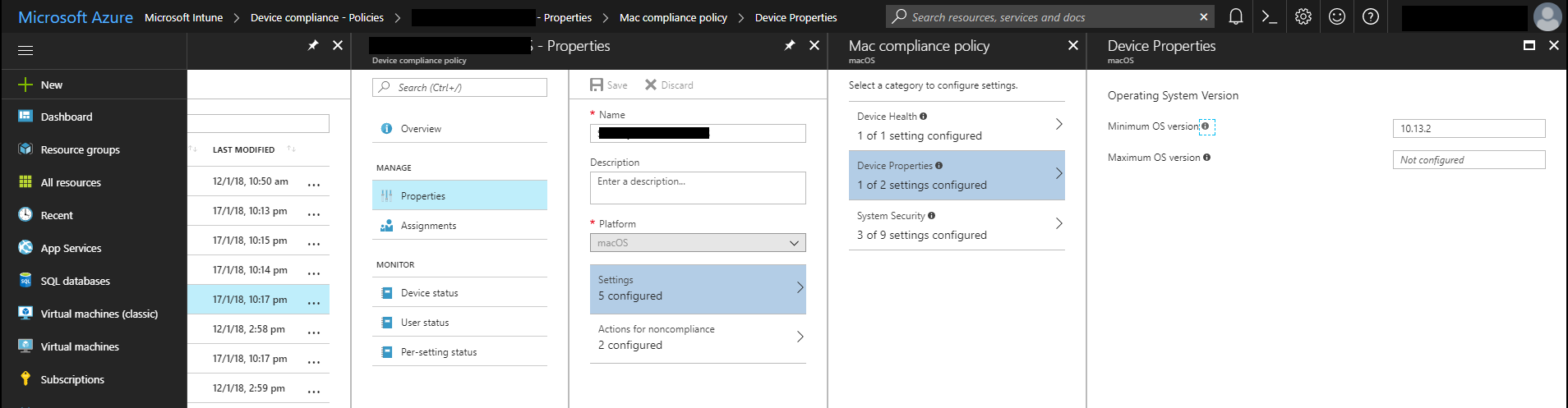
Setting the minimum macOS version in a compliance policy.
Once you have made this change, devices that don't meet the minimum version will be marked as non-compliant during their next compliance evaluation.
Kieran Jacobsen
DNS Squatting with Azure App Services
Several days ago, a post titled: Microsoft Resnet - DNS Configuration Web Vulnerabilitygrabbed my interest. It has an innocuous title, and I hadn’t recalled anyone else talking about a Microsoft DNS Vulnerability. The post wasn't that long, the description and the proof-of-concept are only a few paragraphs in length; however what I did discover was an interesting vulnerability, one that, I feel, is going to become more and more prevalent with the use of Platform As A Service (PaaS) technologies like Azure App Services.
TL DR
- SaifAllah benMassaoud from Vulnerability Lab discovered that
resnet.microsoft.comwas resolving toresnetportal-prod.azurewebsites.net, however there was no Azure App Service at this address. - Anyone could have established an App Service with this DNS name, and thus squat on a
microsoft.comsubdomain. - This vulnerability has the potential to affect any organisation that is using App Services (or similar PaaS services) and custom domain names where they do not have appropriate controls in place.
Like many involved in the InfoSec industry, I monitor a bunch of vulnerability disclosure feeds. They can be a valuable source of knowledge: new techniques, new bugs, new breaches or just interesting tools and technology.
Several days ago, a post titled: Microsoft Resnet - DNS Configuration Web Vulnerability grabbed my interest. It has an innocuous title, and I hadn’t recalled anyone else talking about a Microsoft DNS Vulnerability. The post wasn't that long, the description and the proof-of-concept are only a few paragraphs in length; however what I did discover was an interesting vulnerability, one that, I feel, is going to become more and more prevalent with the use of Platform As A Service (PaaS) technologies like Azure App Services.
Simply put, in this situation, someone had created a CNAME entry within Microsoft’s DNS to point resnet.microsoft.com to resnetportal-prod.azurewebsites.net, unfortunately, resnetportal-prod.azurewebsites.net didn’t exist. This doesn’t sound that bad? Right?

For those who are not familiar with the azurewebsites.net domain, this is the domain used by Azure App Services to host services. When you create an App Service, you specify a name, like myawesomewebapp.azurewebsites.net, you can then deploy your application to that App Service. You can pick whatever you want as the applications name, as long as no one else has taken it before you.
You can optionally specify a custom domain name for your App Service, like myawesomewebapp.com, and use a CNAME entry to map your custom domain to your azurewebsites.net domain (you can now also use an A record).
You should now be able to see the problem; resnetportal-prod.azurewebsites.net didn’t exist yet the name resnet.microsoft.com was pointed to this App service. What does exist is a great squatting/hijacking opportunity. Anyone could have signed up for an Azure Subscription, created an App Service with the name resnetportal-prod.azurewebsites.net and then hijacked resnet.microsoft.com. Vulnerability Lab maanged to discover a pretty significant issue.
What could one do with a subdomain of microsoft.com? Phishing, credential theft, and ransomware comes to mind pretty quickly. I am sure an APT crew would love to have a domain or subdomain like this. There are probably only a few domain names in the world where the average user and even the average system administrator are extremely trusting, and microsoft.com would have to be one.
It isn't just the big organisations like Microsoft at risk. Any company that makes use of PaaS services like Azure App Services and CNAME entries could potentially become the next victim. Attackers might use your domain name to attack others or perhaps create more effective attacks against your own users.
Let’s consider our friends Contoso Limited; they deployed an application for their users to contosoapp.azurewebsites.net, they also established a custom domain name, home.contoso.com. The app was used for some time, and eventually they decide to decommission it. A developer, maybe a sysadmin deletes the Azure App Service, but in their haste, they forget about the DNS entries. More time goes by, and now Bob from an APT group finds the entry for home.contoso.com pointing to contosoapp.azurewebsites.net, he then goes and sets up his own App Service and hijacks home.contoso.com.
Bob the sends out this email to some Contoso email addresses:
Subject: New Employee Experience
From: Contoso Marketing
Body:
    Hi Team,

    We have launched a new employee portal, it is great and has a bunch of awesome features. The site can be found at http://home.contoso.com.

    From,

    The Contoso Marketing Team
Bob doesn’t even need to hide the links in the email, he doesn’t need any of the usual masking techniques, he can simply display the company’s domain name. If the email structure, text and links are well crafted, how would Fred from Accounting determine if this was a legitimate email?
When a user navigates to the page, perhaps it prompts for credentials, maybe it tries to run a browser exploit? I have no doubt that a campaign against an organisation like this would be extremely successful.
Now the details of how SaifAllah benMassaoud from Vulnerability Lab initially discovered the misconfiguration are not described in the release. I am going to guess that he probably used an automated DNS enumeration tool like DNSRecon and DNSNinja. These make the discovery of DNS records easy, and it would be easy to automate additional checks based upon their results to find vulnerable configurations.
In terms of defending against these issues, there are two methods, both of which need to be implemented by organisations:
- Appropriate change control processes: If an App Service or similar PaaS solution is being decommissioned, processes should be in place to ensure that any associated DNS records are removed;
- Monitor your DNS zones for configuration issues: Have automated scripts that check and send alerts if configuration issues are found.
If you haven’t looked at a DNS management tool like DNSControl, do so now! DNSControl was originally developed by Stack Overflow, and you don’t need to have hundreds of domain names and records to gain value from a tool that allows you to manage DNS as code.
DNSControl uses a Domain Specific Language for defining domains and their records, independently of your provider. You can use macros and variables to simplify your configuration. My favorite features is the ability to configure multiple DNS providers, this is great for migrations and for fault tolerance. The CloudFlare provider still allows for control over their proxy as well, ensuring that all of our configuration remains in source control.
Defending against this vulnerability is fairly simple, practice good change control processes and monitor your DNS zones. DNS enumeration tools like DNSRecon and DNSNinja can also assist in determining your organisations risk, whilst DNS as code tools like DNSControl will give us better control over our DNS change processes.
Kieran Jacobsen
Securing PowerShell DSC within Azure ARM Templates
There is no doubt that Azure ARM templates are now the best way to deploy and manage resources within Azure. Recently, I found myself creating an ARM template that deployed some Windows Server 2016 virtual machines with PowerShell DSC extension to configure them. This is typically very simple, define the virtual machine include the extension, however, this time I also needed to include sensitive pieces of information; API keys and credentials, and then I wondered, well, what is the best way to protect these?
If you are familiar with DSC, you can either leave these assets in plaintext or encrypt them with a certificate. Now most documentation and posts found online, will direct for the plaintext approach when using the DSC extension, but there is a significantly better approach, which allows for sensitive information to be encrypted throughout the deployment process. Even better, it is really simple to implement.
Whilst I was working through setting this up, I found there are some quirks in how you need to put the ARM template together, and thought it would be a good topic for a post. I am going to talk about some of the challenges that I found, as well as provide some working examples.
Understand the apiVersion and typeHandlerVersion
When you define the PowerShell DSC extension for an Azure virtual machine, there are two fields that control the version and functionality that the extension will provide, apiVersion and typeHandlerVersion.
In terms of ARM Templates, the apiVersion specifies how the deployment process talks to Azure, that is the layout and content of calls that are made to the underlying API, as such, it controls what we can place into out template files. Microsoft uses the apiVersion to provide backward compatibility. When breaking changes are introduced, typically as part of introducing new features, Microsoft will define a new version. This allows for older scripts and templates to continue to function long after they have been written. For the PowerShell DSC extension, the apiVersion will impact what fields are valid in your template definition.
The second, typeHandlerVersion, is extremely critical, it defines what version of the extension will be deployed to the virtual machine and then executed. Whilst apiVersion controls talking to API, the typeHandlerVersion controls what is happening on the virtual machine itself. This extension regularly receives new features and bug fixes, from support for new operating systems, privacy settings, to WMF versions, and a tonne of issues fixed in between.
Now for the catch, where the devil enters the details. Depending upon what versions you specify, your template syntax may need to change. I found out about these quirks the hard way, this tiny detail can cost you quite a bit of time troubleshooting syntax issues. A mismatch between the apiVersion¸ typeHandlerVersion and your template’s syntax could leave to errors during template validation, DSC compilation or DSC application.
So, what happens if you use older version or mix versions and syntax? Well, nothing bad might happen, or you might end up with either template validation errors, DSC complication errors, or even errors during DSC processing (that is, as the DSC is applied to the server).
But what about autoUpgradeMinorVersion?
According to the documentation, the extensions have a Boolean attribute, autoUpgradeMinorVersion, that allows a user to pick simply the major version, and have Azure install the latest version to their virtual machine during provisioning time. It should be highlighted that this only happens during the provisioning of the extension, extensions will not be upgraded unless the user explicitly removes and then re-provisions the extension. Hot fixes (that is, those of the format of 2.9.x.x), are automatically selected, you don’t get any control. The problem is, this only upgrades the extension, it isn’t going to impact your ARM template syntax.
Be Wary of Visual Studio Created Templates
If you are developing your ARM templates within Visual Studio, you are probably using the “Add New Resource” window to include the PowerShell DSC Extension into your virtual machine. It so happens, that, at least in Visual Studio 2017, it will default to an old typeHandlerVersion of 2.9. For most, this isn’t a problem, especially if autoUpgradeMinorVersion is set to true.
I do want to point out that versions 2.4 up to 2.13 were retired in August 2016.
If you do need to handle sensitive data, then work with the release history for the PowerShell DSC extension, and the documentation on the syntax to ensure that you are working against the latest versions.
How to correctly handle sensitive data?
Note/Warning: At the time of writing, this all worked correctly for versions 2.24 to 2.26. It may not be correct for later versions.
So how do we correctly pass sensitive data between our template through to our virtual machine and DSC?
To begin with, you need to understand that within the properties for the DSC extension, we have two attributes that can be used to specify settings, the first, settings, which you are probably familiar with. There is another, protectedSettings, you might already be familiar with this one, typically you will see configurationUrlSasToken, but you can also specify sensitive data to be passed to the DSC configuration here as well.
So, I have a super simple DSC configuration, it will create a user account using the specified details. I have opted to provide the accounts username and password using a PSCredential parameter, whilst I am also going to set a description for the account, specified as a string parameter.
Configuration Main
{
    Param
    (
        [Parameter(Mandatory=$true)]
        [ValidateNotNullorEmpty()]
        [PSCredential]
        $Credential,

        [Parameter(Mandatory=$true)]
        [ValidateNotNullorEmpty()]
        [String]
        $AccountDescription
    )

    Node Localhost
    {
        User NewUser
        {
            UserName             = $Credential.UserName
            Description          = $AccountDescription
            Disabled             = $false
            Ensure               = 'Present'
            Password             = $Credential.Password
            PasswordNeverExpires = $true
        }
    }
}
Obviously, I want to ensure that credential is kept securely, I don’t want it left in plaintext as part of the DSC compilation.
The ARM template looks like this:
{
    "$schema": "https://schema.management.azure.com/schemas/2015-01-01/deploymentTemplate.json#",
    "contentVersion": "1.0.0.0",
    "parameters": {
        "VirtualMachineName": {
            "type": "string",
            "metadata": {
                "description": "Name of the virtual machine"
            }
        },
        "Username": {
            "type": "string",
            "metadata": {
                "description": "Account Username"
            }
        },
        "Password": {
            "type": "securestring",
            "metadata": {
                "description": "Account Password"
            }
        },
        "DSCPackagePath": {
            "type": "string",
            "metadata": {
                "description": "Path to DSC Package"
            }
        },
        "DSCPackageSasToken": {
            "type": "securestring",
            "metadata": {
                "description": "Sas Token"
            }
        }
    },
    "variables": {
        "AccountDescription": "Account Created as part of DSC"
    },
    "resources": [
        {
            "name": "[concat(parameters('VirtualMachineName'),'/Microsoft.Powershell.DSC')]",
            "type": "Microsoft.Compute/virtualMachines/extensions",
            "location": "[resourceGroup().location]",
            "apiVersion": "2016-03-30",
            "dependsOn": [
                "[concat('Microsoft.Compute/virtualMachines/', parameters('VirtualMachineName'))]"
            ],
            "properties": {
                "publisher": "Microsoft.Powershell",
                "type": "DSC",
                "typeHandlerVersion": "2.24",
                "autoUpgradeMinorVersion": true,
                "protectedSettings": {
                    "configurationUrlSasToken": "[parameters('DSCPackageSasToken')]",
                    "configurationArguments": {
                        "Credential": {
                            "Username": "[parameters('Username')]",
                            "Password": "[parameters('Password')]"
                        }
                    }
                },
                "settings": {
                    "configuration": {
                        "url": "[parameters('DSCPackagePath')]",
                        "script": "MyDsc.ps1",
                        "function": "Main"
                    },
                    "configurationArguments": {
                        "AccountDescription": "[variables('AccountDescription')]"
                    }
                }
            }
        }
    ]
}
See the cool shortcut I have done in the protectedSettings? See how the Credential is built within the template, I provide the username and password and the Azure takes care of the rest and DSC just gets a PSCredential. Pretty neat!
It is worth highlighting that my non-sensitive data, like the AccountDescription, are still found within the settings attribute, I have only moved my sensitive data to protectedSettings. Of course, this decision is entirely up to you.
Now, it might just have been my paranoia, but I found that things when much more smoothly if I placed the protectedSettings, before settings. It shouldn’t matter, but things just seemed happier, and I know that doesn’t sound very logical.
If you have organisational privacy concerns
It is worth noting that if you have strict organisational privacy or data sharing controls, you should disable data collection,
"settings": {
    "privacy": {
        "DataCollection": "Disable"
    }
}
In Summary
The two examples show here are up on GitHub, I have also included a more detailed example as a Visual Studio 2017 project.
Kieran Jacobsen
PS. I am still looking for talented individuals to join my team at Readify. I am after people with a passion for infrastructure, Azure, operations, and everything in between. Does that sound like you? Hit me up on Twitter or LinkedIn!