
Slides and Content from The Boring Security Talk at CrikeyCon VI
Last weekend I spoke at CrikeyCon VI. I am always excited to attend and present at CrikeyCon, the attendees are fantastic and overall the organisers have created an amazing conference ❤.

Droopy the CrikeyCon Mascot
Last weekend I spoke at CrikeyCon VI. I am always excited to attend and present at CrikeyCon, the attendees are fantastic and overall the organisers have created an amazing conference ❤.
This year I presented The Boring Security Talk. This session covers a variety of issues, DNS, Email, CI/CD and dependency management.
You can view the slides here. I will update this past when the video becomes available.
I have put together a list of links and reference materials:
- Hackers exploit Jenkins servers, make $3 million by mining Monero
- DHS: Multiple US gov domains hit in serious DNS hijacking wave
- Advice on Mitigating DNS Infrastructure Tampering
- A Deep Dive on the Recent Widespread DNS Hijacking Attacks
- DNS Squatting with Azure App Services
- DNSControl
- Managing DNS with DNSControl, CloudFlare, DNSimple, GitHub, VSTS, Key Vault and Docker
- MX Toolbox
- PostMark
- Phishing Scorecard
- UK ICO, USCourts.gov... Thousands of websites hijacked by hidden crypto-mining code after popular plugin pwned
- Malicious Docker Containers Earn Cryptomining Criminals $90K
- Postmortem for Malicious Packages Published on July 12th, 2018
- Malicious remote code execution backdoor discovered in the popular bootstrap-sass Ruby gem
- Pipdig Update: Dishonest Denials, Erased Evidence and Ongoing Offences
If you want to catch this presentation in person, you will be able to see it at the Azure Global Bootcamp in Melbourne.
Update - You can now watch the https://www.youtube.com/watch?v=5OlMEi_vcgY!
Tickets now available: 2019 Global Azure Bootcamp Melbourne
I am excited to announce that tickets are now avavailable for the Global Azure Bootcamp - Melbourne! This year the bootcamp will be on Saturday 27th of April 2019.

Global Azure Bootcamp Logo
I am excited to announce that tickets are now avavailable for the Global Azure Bootcamp - Melbourne! This year the bootcamp will be on Saturday 27th of April 2019.
The Global Azure Bootcamp is a free one-day global event organised entirely by users in the community for Azure users around the world who gathered to share essential Azure and Cloud Computing skills and ideas at the seventh annual Global Azure Bootcamp in 2019. We are hosting this event in Melbourne, Australia, but there are many locations, in fact more than 100 other locations worldwide, where the Global Azure Bootcamp will be hosted on the same day.
This is an educational event, and we want it to be an opportunity for everyone to gain new skills. The focus of the event is to teach essential Azure skills to anyone in the technology community who wants to advance their cloud knowledge and the goal of the event is to show people the benefits of Azure while strengthening the Azure community.
Tickets are available via EventBrite, and typically sell out very quickly. We will be maintaining a waiting list once we run out of tickets.
Videos from NDC Sydney 2018
I forgot to post in December that the video from my NDC Sydney session, The Boring Security Talk, is available on YouTube and Vimeo.
Advice on Mitigating DNS Infrastructure Tampering
In January, the Department of Homeland Security (DHS) Cybersecurity and Infrastructure Agency (CISA) took the unusual step of issuing an emergency directive (EN 19-01) about Mitigating DNS Infrastructure Tampering. Several days, the National Cyber Security Centre (NCSC) which is part of the UK Government Communications Headquarters (GCHQ) also issued an alert on DNS Hijacking activity.
In January, the Department of Homeland Security (DHS) Cybersecurity and Infrastructure Agency (CISA) took the unusual step of issuing an emergency directive (EN 19-01) about Mitigating DNS Infrastructure Tampering. Several days, the National Cyber Security Centre (NCSC) which is part of the UK Government Communications Headquarters (GCHQ) also issued an alert on DNS Hijacking activity.
As I said, both agencies warnings unusual. This is CISA’s first ever emergency directive, and it is one of only 8 guidance posts released. NCSC has only issued 2 other alerts, for the TalkTalk breach and when the NHS was impacted by WannaCry.
If you haven’t read the read these alerts or any of the associated news coverage, let me provide a summary. Attackers have been directing attacks to DNS infrastructure, with organisations and government agencies falling victim. The goal of the attackers, thought to be of Iranian origin, is to redirect and intercept web and email traffic (and other network services).
The attacks have typically followed the pattern:
- Compromising user credentials or an attacker that can make changes to DNS
- Next, altering DNS records replacing legitimate records with addresses the attacker controls. This allows them to redirect user traffic to infrastructure they own. They can them manipulate and inspect all the traffic.
- Attackers can obtain SSL certificates as they have control over DNS. This allows encrypted traffic to be decrypted, exposing private data and credentials.
The CISA guidelines are just as applicable for enterprise environments as they are for government agencies. Let’s look at how your organisation could perform the recommended steps.
Action One: Audit DNS Records
The first action item will be the most difficult for most organisations, auditing all your DNS records. For some organisations, even if they prioritise records that are associated with key services offered to their users and customers, MX records and NS records, that could consist of hundreds of entries.
Thankfully, there are some processes and tools that can help us in this task.
I recommend aiming to setup a tool to manage your DNS records, for example, DNSControl. I have a detailed write up on the why and how of DNSControl in my post, Managing DNS with DNSControl, CloudFlare, DNSimple, GitHub, VSTS, Key Vault, and Docker!.
To get your audit underway, I recommend these steps:
- Get a copy of each DNS zone, most providers will provide one in BIND format.
- Follow the Migration and Getting Started guidance for DNSControl.
- Place your DNSControl file into a Git repository.
- Break the zones and files up into smaller chunks so that multiple members of your team can review each entry.
The goal is to end up with a comment for each DNS entry (or almost every entry), explaining the purpose and who requested the entry. Any suspicious entries should be immediately handled as a potential security issue.
You should keep your eye out for dangling DNS records. These are cases where a DNS entry has been defined in a zone that points to an IP address or another record that is no longer in use. I wrote about these as a potential attack vector in 2017, DNS Squatting with Azure App Services. These attacks have become even more prevalent, with government agencies and businesses falling victim.
Side note: This is also a great time to review the SPF records for each of your domains.
Action Two: Change DNS Account Passwords
The second action is simple. Change the passwords for all accounts that can manage your DNS. If you have a higher risk profile, consider changing passwords on a regular basis.
Don’t just think about DNS hosting, depending upon your environment, your domains might be purchased via a different provider than who hosts your DNS zones. These accounts must also be protected.
I recommend, as does the CISA, that you make use of a password manager. This isn’t a post about the value of password managers, however their benefits are clear and well know. If you are unsure about what tools to use in your organisation, I recommend you look at LastPass Enterprise and 1Password for Business. My personal preference is LastPass due to its ability to use a Yubikey for MFA.
Action Three: Add Multi-Factor Authentication to DNS Accounts
I feel like this should be obvious to everyone by know. You need to use MFA for all accounts involved in the administration of your network.
If your domain registrar or DNS provider doesn’t provide MFA, then you must change to a provider that does. You might think I am being overly dramatic, but this is the only appropriate response. While the CISA directive doesn’t go this far, they are clear that you should ensure that you use a provider that does.
It should also be clear that providers that use SMS-based MFA are not recommended. It is just becoming to easy for attackers to perform sim-swap attacks.
Action Four: Monitor Certificate Transparency Logs
The last action point might sound a bit too difficult for small organisations and small IT teams.
Google’s Certificate Transparency project aims to address some of the structural flaws in SSL certificates. It provides an open framework for monitoring and auditing the issuance of certificates in real-time. It allows us to detect SSL certificates that have been issued by a certificate authority either legitimately, mistakenly issued or maliciously acquired. CT logs really do provide a way for the industry to monitor the CAs to ensure they don’t go rogue.
There are free and commercial tools available to monitor the CT logs. My preferred tool comes from a surprising source, Facebook. Facebook’s Certificate Transparency Monitoring tool allows anyone to search for certificates issued to a domain and to subscribe to notifications for a domain. This tool is rather simple to setup, but you will need a Facebook account and have alerts enabled on your account (and in your mobile apps if you want alerts going there).
Summary
To summarise, here is your DNS security checklist:
- Switch to DNSControl and audit your DNS entries.
- Use a password manager to manage the credentials for accounts. Change the passwords if you suspect a breach.
- Use MFA for all DNS management accounts. If your provider doesn’t support MFA, change providers.
- Use Facebook's Certificate Transparency Monitoring tool to identify all certificates being issued for domains you a responsible for.
Call for Speakers: 2019 Global Azure Bootcamp Melbourne
The 7th Edition of the Global Azure Bootcamp - Melbourne, Australia. This year the bootcamp will be on Saturday 27th of April 2019.
Global Azure Bootcamp Logo
The 7th Edition of the Global Azure Bootcamp - Melbourne, Australia. This year the bootcamp will be on Saturday 27th of April 2019. The location will be announced once is it confirmed.
The Global Azure Bootcamp is a free one-day global event organised entirely by users in the community for Azure users around the world who gathered to share essential Azure and Cloud Computing skills and ideas at the seventh annual Global Azure Bootcamp in 2019. We are hosting this event in Melbourne, Australia, but there are many locations, in fact more than 100 other locations worldwide, where the Global Azure Bootcamp will be hosted on the same day.
This is an educational event, and we want it to be an opportunity for everyone to gain new skills. The focus of the event is to teach essential Azure skills to anyone in the technology community who wants to advance their cloud knowledge and the goal of the event is to show people the benefits of Azure while strengthening the Azure community.
Please consider followings when you submit your session:
- We welcome all submissions that talk about Azure and its services. From AI and DevOps to Infrastructure and Security and everything in between.
- Breakout Sessions are 45 minutes; Lightning talk are 15 minutes.
- We will not be able to cover travel or accommodations expenses.
The Call for Speakers will close on the 10th of March, with those successful being notified shortly after.
Tickets for attendees will become available on the 6th of Marth 2019.
Upcoming Conferences
I'm excited to announce that I'll be presenting a new talk, “The Boring Security Talk” at both DDD Melbourne and NDC Sydney in September.
I'm excited to announce that I'll be presenting a new talk, “The Boring Security Talk” at both DDD Melbourne and NDC Sydney in September.
Don’t let the name fool you, the session will cover how you can protect some of the often-overlooked aspects of your organisation’s security! I'll be talking about dependencies, email, DNS and CI/CD. I'm putting together a session that should interest developers, operations and security teams.
Tickets to DDD Melbourne have already sold out, but tickets are still available to NDC Sydney.
I look forward to seeing everyone at DDD and NDC!

I'm speaking at NDC Sydney
Managing Windows Speculation Control Protections with PowerShell DSC
As part of their response to the Speculative Execution vulnerabilities, Spectre and Meltdown, Microsoft released updates for all supported systems. Microsoft made the decision to not enable these protections in Windows Server by default. It's up to you as the administrator to enable the protections.
As part of their response to the Speculative Execution vulnerabilities, Spectre and Meltdown, Microsoft released updates for all supported systems. Microsoft made the decision to not enable these protections in Windows Server by default. It's up to you as the administrator to enable the protections.
Microsoft’s used the reg command to make the registry changes. This tool is great on a single machine, but it doesn’t scale. You need to use a configuration management tool like PowerShell DSC to make the changes at scale.
These changes could be made using the registry DSC resource, but I wanted a more simplified configuration using a custom DSC resource. I looked, and couldn’t find a resource, so I created cSpeculationControlFixes.
Managing the Protections
With the cSpeculationControlFix resource, administrators can enable or disable the protections. You'll need to restart the system for the changes to take effect, cSpeculationControlFix will notify the LCM if a reboot is required.
Configuration EnableSpeculationControl
{
    Import-DscResource -Module cSpeculationControlFixes
    cSpeculationControlFix enableSpeculationControlFix
    {
        Status = 'Enabled'
    }
}
Spectre Variant 2
Microsoft now provides a mechanism for enabling and disabling the Spectre Variant 2 protections separately from the other protections. With the cSpectreVariant2 resource, an administrator can enable or disable just the Spectre Variant 2 protections. For this resource to work, you need to have the updates described in this knowledge base article. Once again, cSpectreVariant2 will notify the LCM if a reboot is required.
Configuration EnableSpectreVariant2
{
    Import-DscResource -Module cSpeculationControlFixes
    cSpectreVariant2 enableSpectreVariant2Fix
    {
        Status = 'Enabled'
    }
}

Configuration DisableSpectreVariant2
{
    Import-DscResource -Module cSpeculationControlFixes
    cSpectreVariant2 enableSpectreVariant2Fix
    {
        Status = 'Disabled'
    }
}
Anti-Virus Compatibility Flag
A massive issue with these updates is that Windows Update won't offer to install these updates unless your anti-virus product as created the appropriate compatibility flag. This issue is, what about those computers, mainly servers, that don’t have an anti-virus product installed? The truth is, these update, nor any further security updates will be available.
To combat this, the cSpeculationControlAVCompatibility resource allows and administrator to enable this flag on systems that don’t have an anti-virus installed.
Configuration EnablecSpeculationControlAVCompatibility
{
    Import-DscResource -Module cSpeculationControlFixes

    cSpeculationControlAVCompatibility enablecSpeculationControlAVCompatibility
    {
        Status = 'Enabled'
    }
}
Getting the Module
The easiest way to get cSpeculationControlFixes is using the PowerShell Gallery, or from GitHub.
Installing the module from the gallery is as easy as:
PS> Install-Module -Name cSpeculationControlFixesIf you discover any issues, please report then via GitHub Issues.
Kieran Jacobsen
Using Intune and AAD to protect against Spectre and Meltdown
I’m a big fan of Intune’s device compliance policies and Azure Active Directory’s (AAD) conditional access rules. They're one piece of the puzzle in moving to a [Beyond Corp][5] model, that I believe is the future of enterprise networks.
I’m a big fan of Intune’s device compliance policies and Azure Active Directory’s (AAD) conditional access rules. They're one piece of the puzzle in moving to a Beyond Corp model, that I believe is the future of enterprise networks.
Compliance policies allow us to define what it takes for a device (typically a client) to be considered secure. The rules could include the use of a password, encryption, OS version or even if a device has been jail-broken or rooted. In Intune we can define policies for Windows 8.1 and 10, Windows Phone, macOS, iOS and Android.
One critical thing to highlight is that compliance policies don’t enforce settings and don’t make changes to a device. They're simply a decision-making tool that allows Intune (and AAD) to determine the status of the device. If we want to make changes to a device, we need to use Intune configuration policies. It's up to the admin or the user to make a non-compliant device compliant.
A common misconception with compliance policies are that the verification process occurs in real-time, that is, when a user tries to login the device's compliance status is checked. The check occurs on an hourly basis, though users and admins can trigger off a check manually.
The next piece of the puzzle are conditional access policies. These are policies that allow us to target different sign-in experiences for different applications, devices and user accounts. A user on a compliant device may receive a different sign-in experience to someone using a web browser on some random unknown device.
How compliance policies and conditional access work together
To understand how Compliance Policies and Conditional Access works, let’s look at a user story.
Fred works in the Accounting department at Capital Systems. Fred has a work PC issued by Capital’s IT Team, and a home PC that he bought from a local computer store.
The IT team has defined two Conditional Access policies:
- For Office 365: a user can connect from a compliant device, or needs to pass an MFA check.
- For the finance system: the user can only connect from a compliant device and must pass an MFA check.
How does this work in practice?
When Fred tries to access his email from his work device, perhaps through a browser, AAD will check his device’s compliance status during login. As Fred’s work PC is compliant, it will allow access to his email.
Fred now goes home, on the train he remembers he forgot to reply to an important email. When Fred gets home, he starts his home PC and navigates to the Office 365 portal. This time, AAD doesn’t know the device, so it will treat the device as non-compliant. This time, Fred will be prompted to complete MFA before he can access his email.
Things are different for Fred when he tries to access Capital’s finance system. Fred will be able to access this system from his work PC as its complaint, assuming he completes an MFA request. Fred won't be able to access this finance system from his home PC as his device isn’t compliant.
These rules allow Capital System’s IT team to govern who can access an application, from what devices they can access it from, and if they need to complete MFA.
Ensuring Spectre and Meltdown Patches are installed
We can use compliance policies to check if a device’s OS version contains the Spectre and Meltdown patches. When Intune checks the devices compliance, if isn't running with expected patch level, it will be marked as non-compliant.
What does this mean for the user? In Fred’s case, if his work PC lacks those updates, he may receive extra MFA prompts and loose access to the finance system, until he installs the right patches.
The Intune portal and PowerBI can be used to generate reports on device compliance and identify devices that need attention. You can also configure Intune to email a user when their device becomes non-compliant. This email can be customised, I recommend that you include a link to a remediation guide or to your support system.
Configuring Intune Compliance Policies
Compliance policies can be created and modified in the Azure Portal via the Intune panel. Simply navigate to the Device Compliance and then Policies. You'll need to create a separate policy for each OS that you want to manage compliance.
Within a compliance policy, we specify an OS version using a “major.minor.build” formatted string.
The major versions numbers are:
- Windows 10 - 10.0 Note that the .0 is important*
- Windows 8.1 - 3
- macOS - 10
We can express things like Windows 10 Fall Creators, or macOS High Sierra using the minor version number.
- Windows 10 Fall Creators Update - 10.0.16299
- macOS High Sierra - 10.13
Finally, we can narrow down to a specific release or patch by using the build version number. For instance, the January updates for each platform are:
- Windows 10 Fall Creators Update - 10.0.16299.192
- macOS High Sierra - 10.13.2
You can specify the minimum and maximum OS version by navigating to Properties, Settings and then Device Properties.

Setting the minimum Windows 10 version in a compliance policy.
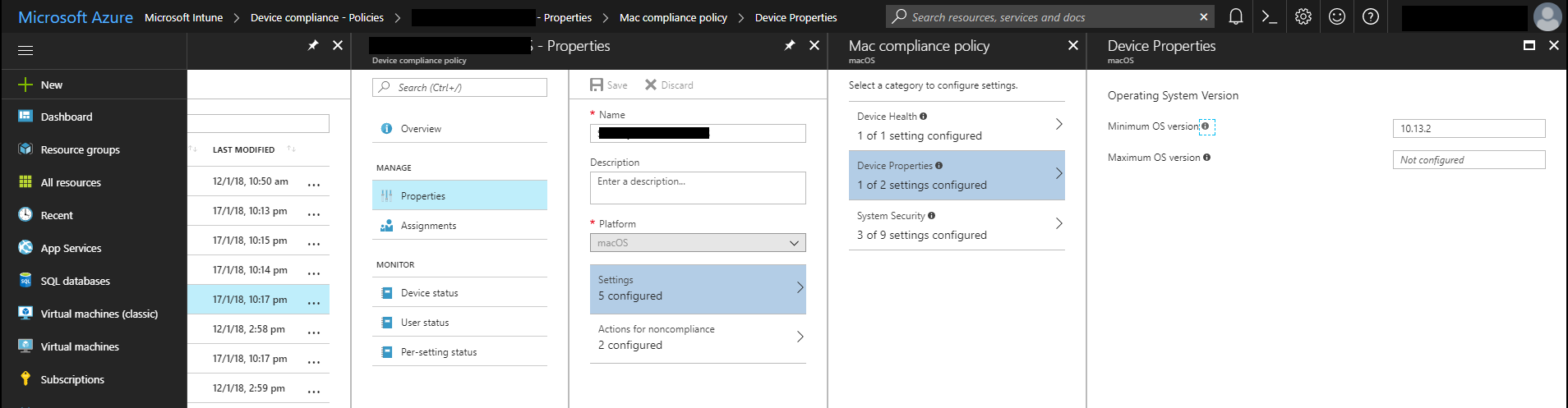
Setting the minimum macOS version in a compliance policy.
Once you have made this change, devices that don't meet the minimum version will be marked as non-compliant during their next compliance evaluation.
Kieran Jacobsen