
How an issue with PowerShell DSC in WMF 5 cost us $5526.95
Short Version
- PowerShell DSC in WMF 5.0 can lead to a significant increase in IO operations.
- Operations will increase over time.
- Fix is included in WMF 5.1, and a workaround is available.
With the move to the cloud, we often don’t consider how simple application bugs could lead to large infrastructure bills, however in this case, a minor issue with WMF 5.0 lead to a IO usage bill of $5526.95 over just under 6 months.
Background
In early December, as part of a regular review of Readify’s Azure usage, we noticed a spike in the usage for one of our Azure Subscriptions. The subscription accounts for a significant portion of our usage, and is used internally.
Looking closely at our usage break down, we started to see something that was very unusual, Data Management Geo Redundant Standard IO - Page Blob Write, had taken 2nd place, overtaking a D13v2 virtual machine that runs 24/7. These write operations are billed in units of 100000000 operations leading to the realisation that we had a significant IO consumer within one of our Azure Storage accounts. We quickly narrowed this down to two storage accounts housing the majority of our IaaS deployments.
Digging Deeper
In terms of IaaS, we don’t have anything deployed that would be considered particularly IO intensive, well, not to this level. We just have some AD DCs, ADFS servers, VPN, VSTS build and some Azure Automation Hybrid workers. Nothing was jumping out as an obvious culprit.
Looking at some metrics for the storage account, two stood out as being unusually high; Total Requests and Total Egress.
I started to look at the usage reports produced by the Azure EA portal. It appeared at first that the usage increased at around September. At first I thought it could have been something to do with some work around Azure Recovery Services, either some replication or backups, but after a few days, it was obvious this wasn't the cause of our issues.
Calling Support
At this point, I raised a support case with the Azure team.
I just want to say a massive thank you to the Azure Support team, they did an amazing job in resolving the issue. They started off just as perplexed as I was. We went through the workloads, and nothing presented as an obvious cause of our issues.
We went back through the usage reports in the EA portal. Looking back further, we determine the usage increased in July. Had we implemented anything in July? At this point, my mind drew a complete blank.
The engineer offered to see if the back-end engineering teams might be able to help us narrow down the usage, hopefully leading us to the VHD(s), and thus the virtual machine that was driving this usage.
The next day, they sent through an excel spreadsheet. The main culprits were our DCs and ADFS servers. These had been around for over a year, and had very little changes. I thanked support and promised I would spend some time studying the machines and get back to them if I found something.
Staring at Resource Monitor
I fired up Resource Monitor on one of the machines, and spent the next hour watching the disk usage. After almost going cross-eyed, I saw it, it was hard to believe, but I saw something that wasn’t quite right. I saw huge write cycles from the WMI Host process to C:\Windows\System32\config\systemprofile\AppData\Local\Microsoft\Windows\PowerShell\CommandAnalysis\PowerShellAnalysisCacheEntry*. Could that be the cause?
I quickly looked on other virtual machines, and saw similar patterns. Things were pointing to these files, but what were they? What was the WMI Host doing?
The cause is found!
I decided the first thing to do is find out what those files were, so I opened my favourite search engine, Duck Duck Go, and entered _wmi host PowerShellAnalysisCacheEntry, and hit search. The first two results, get-psdrive & abnormal I/O and Topic: Dsc v5 get-psdrive abnormal I/O leapt out.
That is when it hit me. We implemented Azure Automation DSC in July. Crap!
I started with the second result, Topic: Dsc v5 get-psdrive abnormal I/O, on PowerShell.org. In the post, from May, the user Brik Brac talks about seeing a major I/O performance issue using DSC v5.
Brik Brac also created the post on the Windows Server User voice, get-psdrive & abnormal I/O, in this post, Zachary Alexander a member of the PowerShell team acknowledged the issue, and posted up a workaround. He also posted that this issue would be fixed in WMF 5.1. WMF 5.1 will be released sometime in January 2017.
Simply put, the issue lies in how PowerShell discovers modules to import when performing certain PowerShell PS Drive Operations, and this heavily impacts DSC. Each time DSC runs, be it monitoring or applying configuration, the number of write operations on these cache files increases, left unchecked, the growth is dramatic. The files don't grow much in size, just the number of write operations to them. You can read more on auto discovery here, How Module Command Discovery Works in PSv3.
xRegistry is one of the resources impacted the most by this issue and as part of our DSC, we use xRegistry resources to harden the SSL configuration on our servers. In fact, this was one of the first reasons we moved to DSC.
I quickly emailed the support engineer I was working with, after a quick phone call, we felt confident that we had found the source of our issues. Now we just needed to prove it.
Resolving the issue
There were two ways we could resolve the issue. Firstly, I opted to install the WMF 5.1 preview onto systems where possible; secondly; we implemented the work around, much like outlined by Zachary in the User Voice post that clears the cache files.
Thankfully, implementing these steps was quite simple, but then we had a nervous wait to see if we had fixed the issue.
I started to see the Total Requests drop over the course of the day whilst I installed WMF 5.1 and ensured DSC was appropriately applied using Azure Automation DSC. By the end of the following day, the Total Requests had completely bottomed out, from over 35M to several thousand.

Ensuring this does not repeat
There are two ways to ensure that something like this doesn’t happen again.
First, implement threshold alerts for your Storage accounts. We didn’t have any defined, and since have. I strongly recommend that everyone ensures that they have alerts for the Total Requests metric.
Next, check your server monitoring. We had monitoring for CPU, memory usage, and free disk space, but I didn’t have any monitoring of disk IO. You can do this in the Azure Portal, or via OMS. If I had this in place, I would have picked up this issue much earlier. The other thing I will be doing is ensuring that our server and storage account deployment templates include basic performance alerting.
More Information
- get-psdrive & abnormal I/O - Windows Server User Voice
- Dsc v5 get-psdrive abnormal I/O - PowerShell.Org
- Windows Management Framework 5.1 Preview - Microsoft Download Center
- Announcing Windows Management Framework (WMF) 5.1 Preview - Windows PowerShell Blog
- How Module Command Discovery Works in PSv3 - PowerTheShell.com
New version of AzurePublicIPAddresses module (0.8.2)
I have just released a new version of the AzurePublicIPAddress module to the PowerShell Gallery.
There are no major changes, just the additional support for two new US Regions:
- Central US EUAP
- East US 2 EUAP
I cannot see much documentation on what these new regions are, I suspect they are the US Government regions.
The only other major change is that all the Pester Tests are now enabled. Previously the UK regions did not have any values in the XML file, these are now being published correctly.
You can get the module from:
Kieran Jacobsen
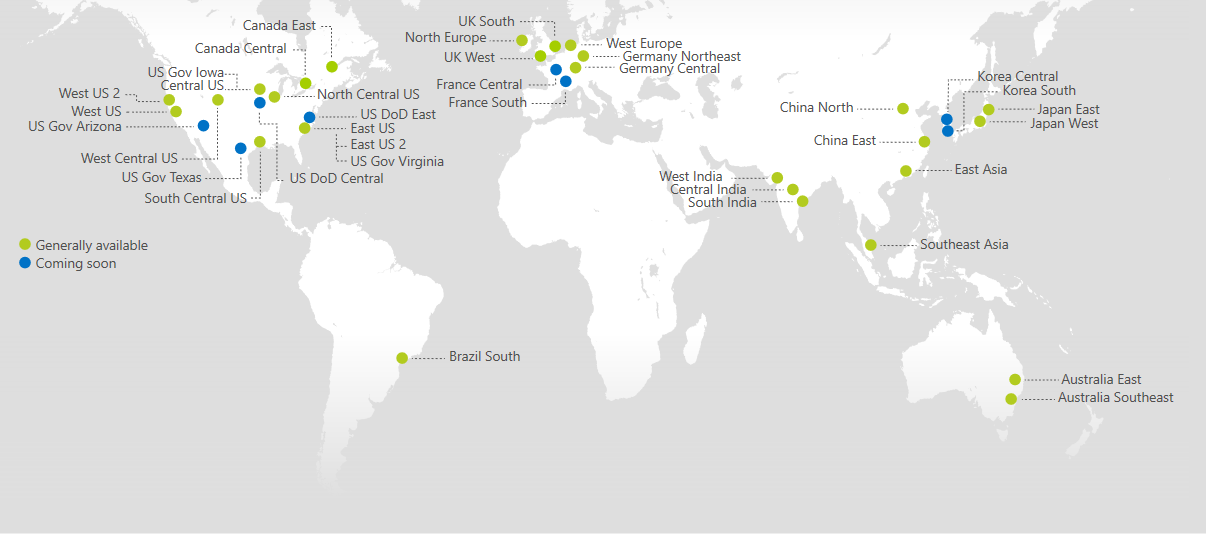
Azure China Region support for AzurePublicIPAddresses

Photo courtesy of Microsoft. https://azure.microsoft.com/en-us/regions/
I am happy to announce version 0.8.1 of Azure Public IP Addresses PowerShell module.
With this release, the module now supports the China North and China East Azure regions.
Microsoft’s China Azure regions are operated by 21Vianet, Microsoft publishes the IP subnets for these regions in a separate file to the other regions, Windows Azure Datacenter IP Ranges in China.
To implement this functionality, some changes have been made to the module. Important Note: these changes do not break any existing functionality and should not impact existing code.
Get-MicrosoftAzureDatacenterIPRangeFile
The switch parameter, -ChinaRegion has been added to the Get-MicrosoftAzureDatacenterIPRangeFile CMDLet. When this parameter is specified, the then China region specific file will be downloaded; if it is absent, then it will download the general region file.
Additional validation has been added to the -Path parameter. Invalid paths should no longer be accepted.
Get-MicrosoftAzureDatacenterIPRange
This function has been to support the China North and China East Regions much like adding any other region.
Changes were required for the -path parameter. When this parameter is absent, both files are automatically downloaded. When -path is present, the CMDLet will now inspect the file spectified, and generate a warning that some Azure regions will be unavailable.
One additional change has been made to this CMDLet. The -AzureRegion parameter will now accept an array containing regions. I have also added additional validation to this parameter to ensure invalid data is not passed in (via [ValidateNotNullOrEmpty()]).
I have attempted to quite throughly test the changes to this CMDLet using Pester, and have expanded the number of included tests to ensure there are no changes.
Getting the module
The module is available via the PowerShell Gallery and GitHub.
Missing Regions
Unfortunately, there is still no support for the following regions:
- US Gov Texas
- US Gov Virginia
- US DoD Central
- US DoD East
- Germany Northeast
- Germany Central
These regions are not included in either of the region files, nor are they in their own region. If and when they are available, I will include support for them.
It should also be noted that currently the UK West region is missing from the Microsoft Azure Datacenter IP Ranges file. I have reached out to Azure support to resolve this.
How Big Is That Subnet?
I recently had a long list of IPv4 CIDR addresses and wanted to know how many hosts there were in total. Looking at the list, there was a mix of common sizes, /29, /24 and /16 but there were a few I just don’t know off the top of my head. The list was long, and it would have be tedious work manually calculating each.
Get-SubnetSize
So, I did what any IT professional in my shoes would do, I wrote some code. The Get-SubnetSize CMDLet will return the total number of usable (often referred to as the number of host) addresses for a specified subnet.
By default, it doesn't count the subnet ID or the broadcast addresses, however, there is a switch -IncludeSubnetIDAndBroadcastAddress, to include those if need them included.
Working with Get-SubnetSize
To work out the size of the subnet 172.16.0.0/24, we simply call: Get-SubnetSize -CIDR 172.16.0.0/24 which will return 254.

Get-SubnetSize -CIDR ’172.16.0.0/24’
What about if we had a subnet mask? Well we can work that out as well! How big is 255.0.0.0? Get-SubnetSize -Subnetmask 255.0.0.0 returns 16777214.

Get-SubnetSize -Subnetmask '255.0.0.0'
How many public IP addresses does Azure use?
Previously I have written about my AzurePublicIPAddresses module in my post, Working with Azure’s public IP addresses. This module allows you to obtain the public IP addresses available in each Azure Region. The module is updated for each new Azure Region that Microsoft introduces.
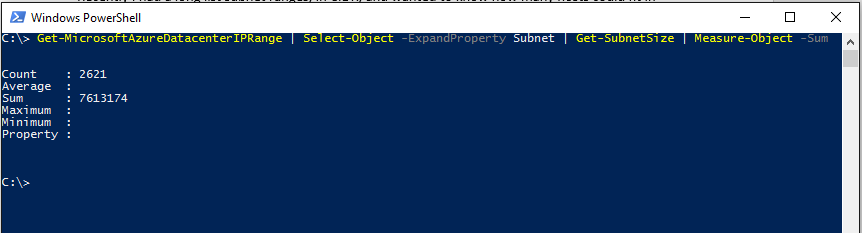
Combining Get-MicrosoftAzureDatacenterIPRange, Get-SubnetSize and Measure-Object together, we can create a one-liner that will give us the total number of subnets and IP addresses.
Get-MicrosoftAzureDatacenterIPRange | Select-Object -ExpandProperty Subnet | Get-SubnetSize | Measure-Object -Sum

Get-MicrosoftAzureDatacenterIPRange | Select-Object -ExpandProperty Subnet | Get-SubnetSize | Measure-Object -Sum
And we can see that there are 2621 Subnets and a whopping 7,613,174 IP addresses!!
Getting the module
Posh-SubnetTools is available from the PowerShell Gallery or from the project’s GitHub page.
This module should work with all versions of PowerShell, including PowerShell Core. I have tested the module on PowerShell 5.1 (Windows 10 Insiders).
I appreciate any issues, pull requests or comments that you may have. Have an idea for a new CMDLet, make a pull request and I will include it!
AzurePublicIPAddresses Version 0.7 released
I have just released a new version of my AzurePublicIPAddresses PowerShell module. With this release (version 0.7), support for the UK data centers has been introduced.
You can learn more about using the module from my blog post, Working with Azure’s public IP addresses. James Bannan has put together a post, Update User Defined Routes for Azure Datacenters with Azure Automation, where he talks about updating user defined routes using the information from my module.
The module can be obtained via the PowerShell Gallery or from GitHub.
Kieran Jacobsen
Microsoft Releases PowerShell to Linux and OS X!
The Announcement
On Friday I woke to the remarkable news that PowerShell has been open sourced, and made available on Linux and Mac. You should read the PowerShell Team’s Announcement, and Jeffrey Snover’s announcement. There is an excellent video on Channel 9, PowerShell on Linux and Open Source.
I want to first start by congratulating everyone over at Microsoft, in particular the PowerShell Team and Jeffrey Snover. I have been an avid user of PowerShell since the codename Monad days and it has been one of the few technology constants in my 10 years in the industry (the other being Active Directory).
It has been a long road since the original Monad Manifesto to reach this milestone, and it could not have been accomplished without Jeffrey’s amazing efforts. Don Jones posted up an excellent article on just why this is such an important accomplishment, you should also read the PowerShell Team's post: Windows PowerShell is now “PowerShell”: An Open Source Project with Linux support – How did we do it?.
This wasn’t an unexpected announcement, in fact, it was quite expected. I never doubted that this accouncement would never occur, to me it wasn't a matter of IF PowerShell would become open source, but WHEN.
Like almost everyone I was in the dark that this was happening, but I had a gut feeling things were close. There were plenty of clues and signs that this was about to happen: .Net Core, Nano Server, Bash on Windows and even the inclusion of Pester in Windows 10. Still, I wasn’t quite expecting to wake up on Friday to the news.
What Was Announced
Microsoft announced that from PowerShell would be run as an open source project, and that an intial alpha release would be made available. This release is version 6.0 and is currently available PowerShell Core, for Windows, Ubuntu, Centos and Mac OS X, with more platforms expected in the future.
So what is PowerShell Core? Core is a cut down version of PowerShell, designed to run on top of the .Net Framework Core edition. We have already seen PowerShell Core in releases of Windows Nano Server. Core edition does not support all of the functionality that the Desktop version will contain.
It is worth noting that this is an alpha release, and as such, you should treat it, and have suitable expectations. This isn’t a production ready release, and likely isn’t going to be for a while yet.
Changes to Remoting
One of the big items in the announcement is the changes to the PowerShell Remoting Protocol (MS-PSRP). Currently the MS-PSRP only supports WinRM, however with PowerShell 6.0, support for SSH will be introduced.
This isn't executing commands over SSH, what is actually occuring is that the objects forming our request are serialized into XML, transmitted over SSH, and then de-serialized. SSH is used as a transport layer for the remoting protocol, mush like WinRM is currently used. SSH is not replacing WinRM, just providing another option for administrators to use.
What this does mean is that you will start to be able to manage your Windows servers from your Macbook, and your Linux servers from your Windows 10 machine.
I had a significant number of issues with WinRM. From its poor performance to its insecure defaults, and I am hoping that the inclusion of SSH support should start to make a difference. If nothing else, it provides a number of new and interesting ways to design and manage our environments.
What’s Missing?
This is a PowerShell Core release, it is based upon the .Net Core, and as such, some things are just simply not going to be there. It should also be obvious that things like WIM and CIM are not supported and will not be available. Get-EventLog isn't there either, as it doesn't fit with the Linux log file model.
Security Impacts!
Security teams should begin to familiarise themselves with not only PowerShell 6.0 and its remoting changes now, but also with Nano Server prior to their release. With a cross pollination of administration teams, that is, Windows and Linux administrators managing each other's eco systems, we are going to see changes in our network architecture and security requirements. SSH connections from a Windows system will begin to move from the abnormal to the normal.
PowerShell is already a highly desirable target for attackers, with more instances of attacks using PowerShell on a daily basis. With the move to include PowerShell on Linux systems, especially servers, the attraction of PowerShell to attacks is likely to increase. The ability to move from a Windows client to that lovely Red Hat farm makes PowerShell an awesome attacker and Red Team tool. Some in the security industry are already calling PowerShell the next Flash or Java for cross platform hacking.
I guess the other thing we need to consider is that a significant number of people are probably pouring over the PowerShell source code with the intention of finding vulnerabilities. Whilst the chances are probably small that someone might find a significant issue, there is still the possibility.
Other Investments to Watch
Looking through the known issues document, and also the PowerShell Teams announcement, two items stood out to me:
- The ability to write CMDLets in Python and other languages
- Unix-style wildcard expansion
Getting Started
The best place to start is the PowerShell Home Page, after that, the PowerShell GitHub repository is your next stop.
Windows
It is worth noting that installing PowerShell 6.0 will not replace your existing PowerShell version, it is installed side-by-side. It is also worth noting that this installs Core edition and not Desktop edition.
Simply grab the right MSI, and run the installer!
Linux
There are official guides for Centos 7, Ubuntu 14.04 and Ubuntu 16.04. The Centos guide should also work for Red Hat.
There are also two great guides:
- Ubuntu 14.04 PowerShell Open Sourced and Available on Linux and MacOS by Boe Prox
- Ubuntu 16.04 Step-by-Step: Getting Started with PowerShell on Linux by Pierre Roman
Mac OS X
You can find Microsoft's instructions for installing here, for more detail check out The IT Hollow's guide, Install PowerShell on Mac.
Other Install Options
There are a bunch of other ways you can get started with PowerShell 6.0:
Once you have PowerShell installed, take a look at some of the demos available.
If you are new to PowerShell and are coming from a Linux or Unix background, check out: A Unix Persons Guide to PowerShell.
Contributing
The great part of any open source project is that we can all play our own part and contribute. You don’t need to be a developer to contribute either, I often contribute to projects by helping out with documentation, or cleaning up simple default configuration files and example usage.
If you feel like contributing, start by reading the contribution guidelines. I also recommend you take a look at the governance process. The Governance process includes how to raise issues, make contributions, and participate in the design process via RFCs. The documents also provide information on the roles and responsibilities of everyone involved in the project.
I recently spent some time working on some issues with the documentation of the PSScriptAnalyzer. The contribution process is similar to that of PowerShell, and it was super simple and easy to create a pull request and work with the PowerShell Team. I would like to point out that if your pull request is large, you may need to sign the Contribution License Agreement, don’t worry, it isn’t difficult and only takes a few seconds to complete. The agreement just covers that the work you are completing is yours and not of anyone else.
Tool Updates
Update your development tools! Virtual Studio Code (and the PowerShell extension), PSScriptAnalyzer and the ISE Steroids have all been updated to include support for PowerShell 6.0.
More Information
- Now open source and cross platform, PowerShell appears on GitHub for Windows, Linux and OSX
- PowerShell is Microsoft’s latest open source release, coming to Linux, OS X
- Announcing PowerShell on Linux - PowerShell is Open Source!
- FAQ: PowerShell on Linux/Mac
- Open source PowerShell on Windows, Linux, and OS X!
- A First Look At PowerShell on Linux
- Why "Objects," Remoting, and Consistency are Such a Big Deal in PowerShell
- Microsoft did What?
With all of this you should be well on your way to working with PowerShell on Linux and Mac OS X! Good luck and don't forget to share your experiences!
Kieran Jacobsen
PowerShell 5, DSC, SABnzbd and Sonarr (Part 1)
I have been trying to do a lot more with PowerShell DSC of late, including writing my own DSC resources.
Last week, I decided to write some resources for SABnzbd and Sonarr. Why? Well firstly for practice, but also because no one else has looked at building up packages for these apps (there wasn’t even Chocolatey packages).
I am not going to go into detail on implementing classes in PowerShell, instead checkout:
- Lee Holmes - Playing with Classes in PowerShell v5 Preview
- Trevor Sullivan - Implementing a .NET Class in PowerShell v5
- Jacob Benson - Creating a Class based DSC Resource using PowerShell
- David O'Brien - Windows PowerShell DSC - classes - introduction (part 1)
- David O'Brien - Windows PowerShell DSC - classes - resource basics (part 2)
- Microsoft MSDN - Writing a custom DSC resource with PowerShell classes
SABnzbd
The module cSABnzbd contains a single resource: cSABnzbdInstall. This resource specifying:
- Ensure: <String> { Ensure | Absent }
- ServiceCredential: <PSCredential>
If you opt for Ensure to be “Present”, then the resource will install and update SABnzbd. That is right, as new versions are released, it will be automatically updated.
The ServiceCredential allows for us to control what account the SABnzbd services run as. If not specified, LocalHost will be used.
GetLatestVersion()
SABnzbd hosts both its source code and its binary releases in GitHub. This is great! GitHub provides a simple REST API that allows us to very easily and dynamically get the latest release for a project.
If we want to get information on the latest release for a particular repository, we simply perform a get request on https://api.github.com/repos/{owner}/{repo}/releases/latest. The response will contain things like the version name, the release date and the assets in the release. The GitHub API doesn’t need any authentication credentials or tokens; these requests can be performed anonymously.
Performing the API request for sabnzbd the URL for us would be https://api.github.com/repos/sabnzbd/sabnzbd/releases/latest, and the returned information looks like:
The function is pretty simple:
Get()
The Get() function is quite easy to implement. We simply need to call Get-Package, and sets the result against the ensure parameter. We then return the object as required. The result is:
Test()
The Test() is also pretty simple. We use Get-Package again to see if the package is installed or not.
If Ensure = ‘Present’, then we need to check:
- If no package was returned, then return false
- If it is installed, compare the installed version to the version number returned using GetLatestVersion()
If Ensure = ‘Absent’, then we simply compare $Package to $null.
Set()
Now the Set() function is more complex.
If Ensure = ‘Present’, then we need to:
- Find the latest .exe in the release information using GetLatestVersion()
- Download the file, this is listed under the assets (look for a .exe).
- Silently run setup using the /S switch
- Install and start the services (optionally running under the user account specified with ServiceCredential).
If we don’t want SABnzbd installed, then we simply call the uninstall.exe.
Using and Configuring SABnzbd
You should be able to access SABnzbd via http://localhost:8080. When you connect the first time, you will be stepped through the initial setup wizard. I haven’t included any resources for specifying any settings like servers, scheduling or custom folders, you can do this as you would normally do. For more help, try the User Manual.
Getting the module
The module can be found on:
You will need PowerShell 5 or greater installed due to the use of Classes.
If you encounter any issues, please raise an issue on the GitHub page.
In the next post we will take a look at Sonarr.
Kieran Jacobsen
Working with Azure’s public IP addresses
If you have spent much time working with Microsoft Azure, Amazon AWS or any public cloud provider, you have probably started to wonder about how many public IPv4 addresses they have. Whilst we know there is a limit to the number of addresses, and that we have reached these limits, it still seems like there are quite a few to go around.
I recently had the need to get a listing of all the Azure subnets, and whilst I did this, I thought it would be good to make a reusable PowerShell module to assist.
Microsoft makes this process pretty easy, providing an XML file under the Microsoft Download Center title: Microsoft Azure Datacenter IP Ranges. There are a few things to note about this file:
- It contains all compute (including SQL),
- It is updated on Wednesday (Pacific Time), but changes are effective from the following Monday (Pacific Time), and,
- The file will contain only production Azure DCs, for instance, at the time of writing the German and Canadian DCs are not contained in the file.
I have developed a PowerShell module that simplifies working with this file by developing CMDLets that:
- Allowing for automated downloads of the file, and,
- Allow for specific DCs to be extracted
Get-MicrosoftAzureDatacenterIPRangeFile provides us with a method to simply and easily access the XML document. If called without parameters, we will get the XML document returned, however we can opt to save the file to disk for future processing.
Then we have Get-MicrosoftAzureDatacenterIPRange. With this CMDLet, we can get a list of objects containing the subnets (in CIDR format) for a specific DC or for all of the DCs. You can specify the path to a previously downloaded file, or it can download the file for us (and keep it in memory).
The module can be found on:
I have tested this module against PowerShell 5, however there should be no issue with earlier versions (I recommend PowerShell 3 or higher). If you encounter any issues, please raise an issue on the GitHub page.
Just in case you were wondering, Azure has approximately 1700 subnets, or around 5.8 million IPv4 addresses!
Kieran Jacobsen